
Amazon Fire Stick USB Power Cable 2 Pack
4.4Editor score
Compatible with multiple streaming devices
Eliminates messy hanging cables
Affordable two pack value
This guide compares the top Fire Stick USB Power Cable options to help you power your streaming device directly from your TV USB port without an AC adapter.
Finding a reliable Fire Stick USB Power Cable is essential for a clean home theater setup. The right cable eliminates clutter and ensures stable power from your TV port.
We compared ten top-rated cables based on compatibility, length, build quality, and power delivery features. Our analysis highlights models that work seamlessly with various Fire Stick generations.
Each pick shows specific strengths like extra length, built-in surge protection, or universal adapters. Note that prices and availability change frequently so check current listings before buying.
4.4Editor score

4.6Editor score

4.5Editor score
This side-by-side comparison evaluates each cable on key specs like length, connector type, and compatibility to help you find the perfect match for your setup.


This official cable solves the common issue of Fire TV Sticks needing more power than a TV USB port provides. It features advanced circuitry that stores and releases energy as needed for stable streaming.
We may earn a commission when you buy through this link, at no additional cost to you.
The built-in power management ensures your device runs without flickering or restarting even when the TV port output is low. This reliability makes it ideal for users who want a hassle-free experience.
While it costs more than generic cables the included adapter and official compatibility justify the price. You avoid risks of damage from inconsistent voltage or poorly made third party accessories.
Buy this if you value reliability and official support. It is the best choice for ensuring your Fire Stick works perfectly without hunting for an outlet near your TV.
The cable includes special circuitry that enhances peak power capability by storing excess energy and releasing it as needed for stable streaming.
It works seamlessly with all Fire TV Stick models and integrates adapters for both USB-C and Micro-B connection types.
We may earn a commission when you buy through this link, at no additional cost to you.
This adapter includes a built-in conversion module to ensure constant voltage output to your streaming stick. It helps prevent frequent restarts caused by insufficient USB power from older TVs.
We may earn a commission when you buy through this link, at no additional cost to you.
Multiple protection circuits safeguard against short circuits and over current conditions. The automatic power cutoff when the TV turns off saves energy and prolongs device life.
Users should note safety warnings about avoiding high temperature environments and ensuring ventilation. It does not support the newest HD 2026 model so check compatibility first.
Choose this for a balanced mix of safety features and affordability. It is a solid choice for standard Fire Stick models needing consistent power delivery.
Multiple protection circuits ensure constant voltage and current output while preventing overheating and short circuits during operation.
The adapter automatically stops power supply when the TV turns off to save energy and reduce environmental impact over time.
We may earn a commission when you buy through this link, at no additional cost to you.
This two pack offers excellent value for households with multiple streaming devices. The simple micro USB design connects directly to your TV port for a cleaner setup.
We may earn a commission when you buy through this link, at no additional cost to you.
It works with most Fire Stick models and other streaming sticks like Roku and Chromecast. You can replace multiple cables with this single purchase for various needs.
The short length is ideal when ports are close together but may not work if your TV USB port lacks sufficient power. Test with your original cable before purchasing.
This is the best budget choice for basic setups with powerful TV ports. It simplifies your entertainment area without breaking the bank.
The cable supports all Micro USB powered streaming HDMI devices including Fire TV Stick, Roku, and Chromecast models.
Eliminates long hanging cables by powering your device directly from the TV USB port for a fresh clean look.
We may earn a commission when you buy through this link, at no additional cost to you.
This long cable allows you to place your TV stick up to 10 feet away from the power source. It is ideal for setups where TV ports are hard to reach or blocked.
We may earn a commission when you buy through this link, at no additional cost to you.
The two pack provides extra cables for tablets and other micro USB devices. You get versatility beyond just streaming sticks with this purchase.
While great for reach it may not solve power insufficiency issues if your TV port is weak. The extra length can also lead to cable management challenges.
Buy this if you need reach more than power boost. It is perfect for high mounted TVs or complex home theater setups.
The 10-foot length allows you to use your TV stick or tablet while charging far away from the power source.
Compatible with Fire TV Stick, Roku, Chromecast, and Kindle Fire tablets for versatile charging options.
We may earn a commission when you buy through this link, at no additional cost to you.
This bundle includes a dedicated 10W adapter for reliable power independent of your TV. The braided cable is durable and supports data transfer alongside charging.
We may earn a commission when you buy through this link, at no additional cost to you.
It provides up to 2A current for fast charging and includes safety certifications like UL and FCC. You avoid relying on TV USB power limitations entirely.
The 6ft length is moderate and may not reach wall outlets behind high TVs. It does not work with newer USB-C Fire Stick models so verify your device first.
Choose this if you want guaranteed power from a wall outlet. It is ideal for users who need stability regardless of TV port quality.
UL Listed and FCC certified with protections against over heat, over current, and short circuit to ensure safe usage.
The 10W adapter delivers up to 2A charging current with low energy consumption conforming to US Energy VI standards.
We may earn a commission when you buy through this link, at no additional cost to you.
This simple cable offers a straightforward solution for extending power reach without complex features. It uses standard USB 2.0 connectors for basic connectivity.
We may earn a commission when you buy through this link, at no additional cost to you.
The 10ft length provides flexibility for placing your stick away from the TV port. It is a budget friendly option for users who just need length.
Quality may not match premium cables and it lacks advanced power management. Ensure your TV USB port is strong enough before relying on this.
Buy this for basic needs on a tight budget. It works well when you simply need to bridge a small distance.
Features USB 2.0 high speed transfer rate with standard USB A to Micro USB male connectors for easy installation.
We may earn a commission when you buy through this link, at no additional cost to you.
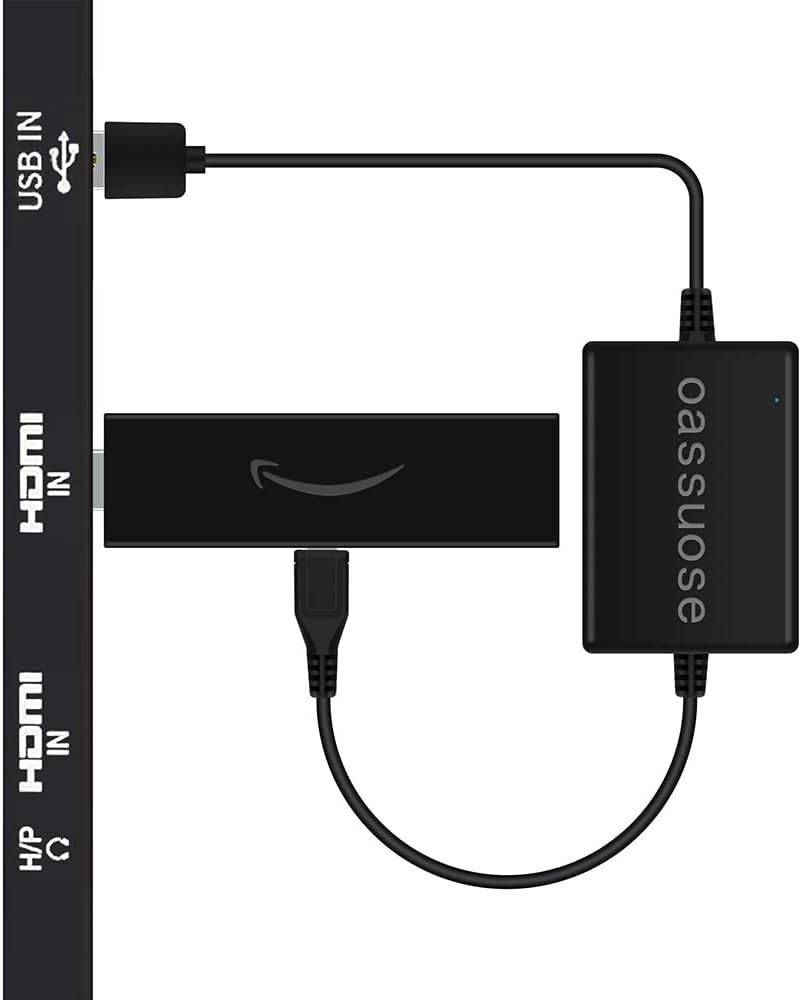
This adapter combines smart features like LED indicators and intelligent power management for optimal performance. It ensures stable streaming for 4K content and Dolby Atmos.
We may earn a commission when you buy through this link, at no additional cost to you.
The smart LED lights show when the device is in optimal operation so you know it is working correctly. It also cuts power when the TV turns off to save energy.
The premium price reflects the added technology and build quality. It is not compatible with USB-C Roku Ultra models so check your device interface before buying.
This is the top choice for high-end streaming needs. It is ideal for users who want visual confirmation and advanced power management.
Designed with Smart LED lights that indicate optimal performance operation so you know when power is stable.
Automatically powers the stick when TV turns on and cuts power when TV turns off to prevent overheating and conserve energy.
We may earn a commission when you buy through this link, at no additional cost to you.
This dedicated charger offers reliable power from a wall outlet independent of TV ports. It features multiple safeguards against short circuits and over-charging to protect your device.
We may earn a commission when you buy through this link, at no additional cost to you.
The 10W fast charging ensures safe current output up to 2A for quick setup. The materials are flame retardant to ensure long service life and safety.
It does not fit the newest HD 2026 model so compatibility is key. You rely on a nearby wall outlet which may be less convenient.
This is best for users who prefer wall power for stability. It is ideal when you want fast charging and safety guarantees.
Supports fast charging with safe current output up to 2A and includes safeguards to prevent over-charging and overheating.
Uses high-quality flame retardant materials that ensure durability and long service life without free winding issues.
We may earn a commission when you buy through this link, at no additional cost to you.
This cable supports fast 2A charging and high speed data transfer for many devices beyond streaming sticks. The built-in magnetic ring ensures a secure connection during use.
We may earn a commission when you buy through this link, at no additional cost to you.
It is compatible with PS4, Xbox controllers, and tablets providing versatility for your gaming and reading setup. The 22 AWG wires ensure stability and safety.
It does not work with USB-C devices so double-check your port before buying. The generic build works well but lacks specialized power boosting features.
Buy this if you need one cable for multiple gadgets. It is ideal for households with mixed device ecosystems.
Enjoy uninterrupted use with a secure stable connection featuring precision connectors and a built-in magnetic ring to prevent signal drops.
Supports fast 2A charging and 480 Mbps data transfer with 22 AWG low-impedance wires for safe and stable performance.
We may earn a commission when you buy through this link, at no additional cost to you.
This cable is designed for TVs with USB 3.0 ports which provide more power than older versions. The 8.5 inch length tucks neatly behind the TV to remove clutter.
We may earn a commission when you buy through this link, at no additional cost to you.
It eliminates the need for a separate AC adapter and keeps your setup clean. The efficient transfer design ensures stable power delivery when port specs are met.
The short length means it only works if ports are very close together. Ensure your TV has a USB 3.0 port for best results.
This is best for modern TVs with strong ports. It is ideal for users seeking the cleanest possible setup.
The optimal length of 8.5 inches powers your Fire TV Stick using your TV's USB port without wires dangling from the back.
This cable is compatible only with new HDTVs with USB 3.0 ports that provide sufficient power for the streaming device.
We may earn a commission when you buy through this link, at no additional cost to you.
Choosing the right cable requires understanding your TV port capabilities and specific device needs. Here are key factors to consider for a stable setup.
Not all TV USB ports provide enough power to run a Fire Stick reliably. Many older or budget TVs only output 0.5A whereas Fire Sticks often need 1A or more. If your TV port is weak the Stick may restart constantly flicker or fail to boot. Always check your TV manual for port specifications before buying a simple cable solution.
Check your TV manual to confirm the port output. If unsure test with the original adapter first.
Most Fire Sticks use Micro USB but newer models use USB-C. Ensure the cable matches your specific device port. Some cables include adapters to cover both types adding versatility. If your device has changed generations verify the connector type on your existing power input.
Match the connector type to your Fire Stick model to ensure a secure physical connection.
Measure the distance between your TV USB port and HDMI port. Standard cables are often around 6 to 10 feet. Some options are very short at 8 inches for close ports. If your TV is mounted high or ports are blocked a longer cable provides flexibility for better placement.
Measure your setup to choose a length that fits your mounting and port configuration.
Some premium cables include circuitry to boost power from weak TV ports. This feature stabilizes voltage and stores energy for peaks. It prevents restarts and ensures smooth streaming. If you have a weak TV port look for cables that mention power boosting or management circuits.
Look for advanced circuitry if your TV USB port is known to be low power.
Braided cables or those with thick copper wires last longer and reduce resistance. Check for safety certifications like UL FCC or RoHS. These ensure the product meets electrical safety standards. Flammable or cheap materials can pose risks over time especially with continuous use.
Choose cables with safety certifications and durable materials for long term reliability.
Decide if you need a wall adapter or TV USB connection. Wall adapters guarantee power but add clutter. TV cables save space but rely on port quality. If you need stability choose a wall charger. If you prioritize aesthetics choose a TV cable.
Decide between wall power for stability or TV power for clean aesthetics.
Reputable brands often offer better quality control and support. Check for warranty periods like 24 months which indicate confidence in build. Generic brands may save money but risk safety issues. Reading user reviews helps verify real world reliability and support responsiveness.
Consider brands with strong reviews and clear warranty terms before buying.
If you power multiple devices like Roku or tablets find a versatile cable. Some cables work with many Micro USB devices. This reduces the number of adapters you need. It is cost effective for households with multiple streaming boxes or tablets.
Select versatile cables if you need to power multiple different Micro USB devices.
To install simply connect the USB end to your TV USB port and the Micro USB end to your Fire Stick. Ensure the connection is snug and secure to prevent power drops. If using a wall adapter plug it into a nearby outlet instead.
Inspect the cable regularly for fraying or damage to wires. Avoid placing it near heat sources or under heavy objects to prevent wear. Keep the connectors clean and free from dust or debris to maintain good contact.
If you notice flickering restarts or device failures check the power source. A weak TV port may require a different cable or adapter. Ensure the cable is rated for 2A output to support your device properly.
Yes if your TV USB port provides enough power. If your TV port is weak the Stick may still need the original wall adapter for stable operation. A cable alone does not boost power unless it includes advanced circuitry.
Check your TV manual for USB port output specs. If the Stick flickers or restarts with the cable your port is likely weak. You may need a wall adapter instead for consistent performance.
The 4K Max uses USB-C so you need a cable with a USB-C connector. Some options include adapters for both USB-C and Micro-B. Verify compatibility with your exact model before buying.
A short cable keeps your setup clean but only works if ports are very close together. If ports are far apart it may not reach and cause connection issues. Measure your gap before choosing a short option.
Some sources suggest waiting 10 minutes before use to ensure stability. This allows the device to initialize properly. It is recommended for cables that include power management modules.
No only cables designed for Micro USB or USB-C and that match your device port will work. Using incompatible cables may lead to poor performance or damage. Check compatibility lists before purchase.
Yes most cables work with Roku, Chromecast, and similar Micro USB powered devices. Just ensure the connector matches. Some brands explicitly support universal streaming stick use.
Restarting usually means insufficient power from the TV USB port. A weak port may fail to sustain the Stick under load. Try a wall adapter or a cable with power boosting features.
The right cable depends on your TV capabilities and your tolerance for wall adapters. For most users the official Amazon cable offers the best balance of power and convenience.
Prioritize safety features and power management if you have a weak TV port. If budget is a concern look for value packs that still support Micro USB devices.
Always check current prices and compatibility before finalizing your purchase. Ensure your choice matches your Fire Stick model and TV port specifications for best results.