
MINISFORUM M1-1390
4.5Editor score
Intel Core i9-13900HX processor
32GB DDR4 memory standard
Triple 4K display output support
This guide compares the top ten Intel Core i9 Mini PC models to help you find the best compact desktop for work or gaming.
Finding a powerful compact computer often feels impossible until you explore Intel Core i9 Mini PC options. These devices pack serious processing power into small boxes that fit anywhere.
We compared ten models based on performance, connectivity, and real-world usability. Each pick balances speed, storage, and features to suit different professional and home needs.
Every entry shows what the system delivers, key specs, and who benefits most. Keep in mind that availability and details can shift, so verify current listings before buying.
4.5Editor score

4.5Editor score
4.6Editor score
The following table offers a quick side-by-side look at every model ranked in this guide. Compare core counts, memory types, and key ports to narrow your choice.


The MINISFORUM M1-1390 earns top billing by delivering flagship i9 power at an accessible cost point. Its hybrid architecture excels in multitasking while maintaining a compact footprint for any desk.
We may earn a commission when you buy through this link, at no additional cost to you.
With 32GB of DDR4 RAM and a blazing fast 1TB PCIe 4.0 SSD, this system handles large projects with ease. The ability to expand to 96GB of RAM ensures longevity for heavy users.
The trade-off lies in DDR4 speeds compared to DDR5 models. However, for office work and creative tasks, the performance remains smooth and responsive without thermal throttling.
Buy this if you need maximum multi-core power without overspending. It is an ideal pick for offices or home setups that demand reliability and strong raw processing capability.
Dual M.2 slots allow you to reach up to 8TB of storage. This flexibility is rare in tiny PCs and supports massive media libraries or complex project workflows.
Connect up to three 4K displays via HDMI and DP. This setup transforms the PC into a command center for trading, coding, or design work.
We may earn a commission when you buy through this link, at no additional cost to you.
The Beelink GTi13 stands out for its modern DDR5 memory and unique AI features. It offers a premium experience that blends productivity tools with smart home integration capabilities.
We may earn a commission when you buy through this link, at no additional cost to you.
Its hybrid architecture manages complex tasks like rendering while staying cool. The fingerprint sensor adds convenience for secure logging into your system without needing a password every time.
While the cost is higher, the inclusion of Thunderbolt 4 and dust-proof design justifies the investment. These features provide long-term value for tech enthusiasts and professionals alike.
Choose this unit if you value innovation and speed. The AI voice interaction and fast network options make it a versatile hub for modern digital workflows and smart offices.
USB4 ports support high-speed data and video output. You can connect to high-speed storage or external GPUs to expand your workstation significantly.
The MSC2.0 cooling system fights dust buildup. This design choice helps maintain performance over time without needing frequent cleaning or maintenance.
We may earn a commission when you buy through this link, at no additional cost to you.
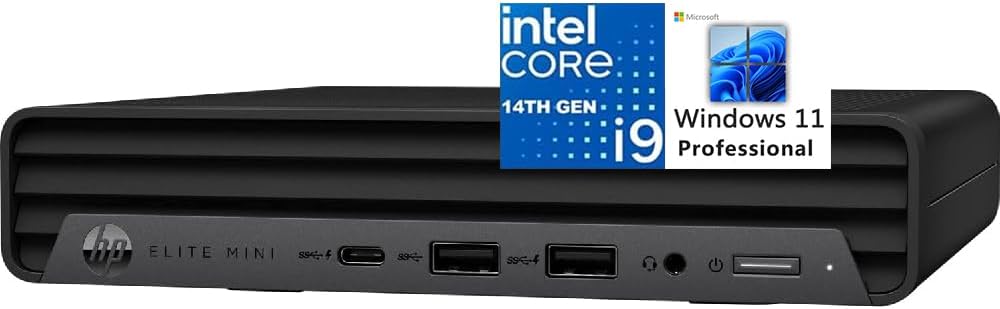
HP delivers a refined professional machine with the Elite Mini 800 G9. It balances raw power with whisper-quiet operation, making it perfect for quiet offices or shared workspaces.
We may earn a commission when you buy through this link, at no additional cost to you.
The 14th Gen i9 chip provides incredible speed. Combined with Windows 11 Pro, it includes advanced security and management features that IT departments and professionals require for daily work.
The only downside is the 16GB RAM limit. While fast, heavy multitasking users might find this restrictive. However, for standard enterprise workloads, it remains highly efficient.
This is the top choice for corporate buyers. The build quality, quiet fans, and included Pro OS license make it a reliable standard for business environments everywhere.
Advanced cooling ensures silent performance. This feature is vital for client-facing offices or quiet home studios where noise is a major distraction.
Pro edition includes BitLocker and remote tools. These security and management features are essential for professional environments handling sensitive data.
We may earn a commission when you buy through this link, at no additional cost to you.
The KAMRUI Hyper H2 pushes speed to the limit with a 14th Gen i9-14900HX. Its clock speed of 5.8GHz ensures that single-core performance remains unmatched in this form factor.
We may earn a commission when you buy through this link, at no additional cost to you.
A professional-grade cooling system keeps temperatures in check even under heavy loads. This stability is crucial for rendering or gaming where heat buildup can cause slowdowns.
The compact design hides power in a tiny 5-inch frame. This size makes it easy to hide behind monitors, keeping desks tidy while still delivering desktop-level performance.
Pick this for raw speed and space saving. If you need the fastest possible clock speeds in a box this small, the Hyper H2 is the clear leader right now.
Dual copper heat pipes and a dual-fin module dissipate heat effectively. This design prevents throttling during long work sessions.
The brand offers lifetime guidance and service. This assurance helps users resolve setup issues or concerns without delay.
We may earn a commission when you buy through this link, at no additional cost to you.
The NAB9S is a unique networking powerhouse. It features dual 2.5G Ethernet ports which are rare in small PCs, making it perfect for home labs or network routing tasks.
We may earn a commission when you buy through this link, at no additional cost to you.
Performance is driven by a 13th Gen i9 processor. Optimized cooling channels ensure the system stays stable even when running multiple network services or virtual machines simultaneously.
Storage and memory start lower than other models but are easily expandable. The tool-free top cover allows quick upgrades without tools or technical expertise.
This model suits network admins and homelab users. If you need multiple network connections or want to host servers locally, the NAB9S fits the bill perfectly.
Two high-speed ports enable link aggregation or firewall setups. This dual-network capability separates traffic for better security and performance.
Support for four displays allows massive multi-monitor setups. This layout is great for monitoring dashboards or complex financial trading screens.
We may earn a commission when you buy through this link, at no additional cost to you.
The MS-01 is a true mini workstation designed for enterprise needs. It includes support ports and expansion slots that usually require a massive tower chassis to house.
We may earn a commission when you buy through this link, at no additional cost to you.
With 10Gbps network ports and a PCIe slot, it can handle heavy data tasks or even external GPUs. This capability opens up possibilities for rendering or specialized networking tasks.
While complex for general users, professionals will love the raw connectivity options. The three M.2 slots allow for massive internal storage arrays without external drives.
Choose this for serious work. It is the best pick for IT professionals or engineers who need enterprise-grade networking and expansion in a small box.
The x16 slot accepts external GPUs or network cards. This feature is rare in mini PCs and drastically expands what the system can do.
10Gbps SFP+ ports enable superfast file transfers. Ideal for video editors or data centers needing rapid access to network storage.
We may earn a commission when you buy through this link, at no additional cost to you.
The IT13 MAX introduces the new Intel Ultra 9 processor with a dedicated NPU. This chip is designed to handle AI workloads locally, ensuring privacy and speed for developers.
We may earn a commission when you buy through this link, at no additional cost to you.
With 16GB of DDR5 and strong graphics, it runs AI models and video editing smoothly. The silent cooling system means you can work in quiet environments without fan noise.
A 3-year warranty shows confidence in durability. Most rivals offer only one year, making this a safe investment for business or heavy personal use.
This is the future for AI tasks. If you are working with local models or need a private assistant, the IT13 MAX is the best current choice.
The NPU handles AI tasks efficiently. This keeps data on-device for better security and faster processing speeds.
Extended coverage provides peace of mind. This protection is valuable for long-term projects and business reliability needs.
We may earn a commission when you buy through this link, at no additional cost to you.
For experts who want total control, this barebone version is perfect. You buy the components that fit your needs, avoiding pre-installed software you might not use.
We may earn a commission when you buy through this link, at no additional cost to you.
The chassis supports high-end upgrades like external GPUs. It offers the same connectivity as the full workstation but gives you the freedom to choose every part.
Assembly takes time but ensures you get exactly what you want. It is a great project for tech enthusiasts who enjoy building their own custom machines.
Pick this for ultimate flexibility. If you need specific RAM or storage configs, or want to add a GPU, this model provides the best starting platform.
Build it exactly as needed. This approach saves money and ensures compatibility with your specific workflow or requirements.
A clean install means faster boot times. Start fresh with your chosen OS without unnecessary programs slowing down the system.
We may earn a commission when you buy through this link, at no additional cost to you.
The XT13 Pro focuses on capacity and workflow with a massive 2TB SSD and 32GB RAM. This setup is perfect for creators who need to store large files without worrying about space.
We may earn a commission when you buy through this link, at no additional cost to you.
It supports AI workflows for writing and research efficiently. The Wi-Fi 6E ensures stable connections for cloud-based tasks or online collaboration while you work.
Integrated graphics are not meant for heavy gaming but handle AAA titles at lower settings. The focus is on productivity and creation rather than high-end gaming performance.
Choose this for storage needs. If you need to keep many projects and games on one drive, the extra space and memory make this a strong contender.
Large capacity supports huge libraries. This is ideal for video editors or designers who need quick access to many large files locally.
Extended coverage for peace of mind. This service helps protect your investment and ensures support for any future hardware issues.
We may earn a commission when you buy through this link, at no additional cost to you.
The GT13 MAX prioritizes data privacy with local AI capabilities. You can run models directly on the device, keeping sensitive documents secure without uploading them to the cloud.
We may earn a commission when you buy through this link, at no additional cost to you.
Its Wi-Fi 7 support prepares it for future networks. This ensures you have the fastest possible wireless speed for data transfers or remote work setups.
While memory is capped at 16GB, the system runs efficiently. The focus here is on intelligent tasks and privacy rather than raw storage capacity.
This suits privacy-conscious professionals. If you work with sensitive data or want private AI assistance, this model offers the right balance of security and performance.
Keep sensitive data on-device. This approach enhances security by avoiding unnecessary uploads to external servers.
Connect four displays at high resolution. This is ideal for trading or monitoring setups that require massive screen real estate.
We may earn a commission when you buy through this link, at no additional cost to you.
Choosing the right mini PC requires understanding your specific needs for speed, storage, and connectivity. This guide breaks down the factors that matter most.
Look for the specific i9 model like 13900H or 14900HX. Higher numbers and the 'HX' suffix usually mean better performance for creative work or heavy multitasking.
Prioritize models with higher base clock speeds to ensure smooth operation for everyday tasks without lag.
32GB RAM is standard for high-end models, but check if the RAM is expandable. Storage speed matters more than size, so look for PCIe 4.0 SSDs.
Ensure there is room to add more drives later if your data needs grow over time.
Check for Thunderbolt 4 or USB4 ports if you need fast data transfer or external graphics. Also look for multiple HDMI or DisplayPort outputs for multi-monitor setups.
Extra ports like SD card readers or Ethernet ports can save you from buying extra adapters later.
Small PCs run hot. Look for reviews mentioning quiet fans or advanced cooling systems like heat pipes. This ensures the PC does not throttle under load.
A quiet system is crucial if you plan to use it in a home office or library.
Aim for a warranty of at least three years. Some brands offer limited support, which is risky for long-term work.
Longer warranties give you peace of mind and protect your investment against hardware failures.
Most units come with Windows, but check if it is Home or Pro. Pro is better for security and business features. Some barebone models come without any OS.
Verify you can install your preferred Linux distros if you need specific development tools.
Newer Ultra processors include NPUs for AI tasks. If you need local AI processing or privacy, this feature is becoming very important.
This can speed up tasks like transcription and image editing without using the main processor.
Ensure proper ventilation. Place the PC in an open area with space around vents so it can breathe and stay cool.
Use a surge protector. Power surges can damage sensitive electronics. A simple surge protector extends the life of your mini PC.
Keep ports clean. Dust can clog connectors. Use compressed air occasionally to blow out debris and maintain good connections.
Yes, but with limitations. While the i9 processor is fast, these units rely on integrated graphics. They can play many modern games at 1080p or 1440p but not ultra settings.
Most models support up to 32GB or 64GB RAM. Check the specific specs for DDR5 or DDR4 slots before buying. Some high-end models allow significant expansion for heavy multitasking.
Most models support triple or even quad 4K displays. This allows for huge productivity setups using just one tiny device. It is perfect for stock trading or coding work.
They are generally quieter than traditional towers. However, fans may ramp up under heavy loads. Look for models with 'silent' or 'low noise' in the specs if this is a priority.
The 14th Gen offers slightly higher speeds and better efficiency. The 13th Gen is often cheaper and still very fast. For most tasks, the performance difference is minimal.
Most full units do, but barebone versions do not. Always check the product details for 'Barebone' or 'Without OS' labels before purchase to avoid surprises.
The Minisforum M1-1390 and KAMRUI Hyper H2 offer the best balance of power and price. The HP Elite Mini 800 G9 stands out for professional enterprise needs.
Prioritize memory expansion and cooling if you plan to use the device for years. These two factors often determine longevity more than raw processor speed.
Prices and availability can change quickly in this category. Always verify current stock and warranty terms before placing your order to ensure a smooth purchase.