
SUPCASE Charging Dock for Nintendo Switch 2 Joy Con
4.7Editor score
Dual side charging support
Built in safety protection chip
Compact space saving design
This guide compares the top 10 Controller Charging Dock for Switch 2 options based on charging speed, RGB lighting, storage capacity, and compatibility to help
Keeping your gaming controllers powered up is essential for uninterrupted play sessions. A reliable controller charging dock ensures your devices are always ready when you need them most.
We have carefully evaluated the top ten options available in the market today. Our analysis focuses on charging efficiency, build quality, and additional features like storage and lighting effects.
Each pick highlights key strengths and potential drawbacks for different user needs. Please note that prices and availability can change frequently across online retailers.
4.7Editor score

4.7Editor score

3.5Editor score
The following table provides a side-by-side comparison of all ten top rated charging stations to help you quickly identify the best match for your specific gaming setup and controller types.

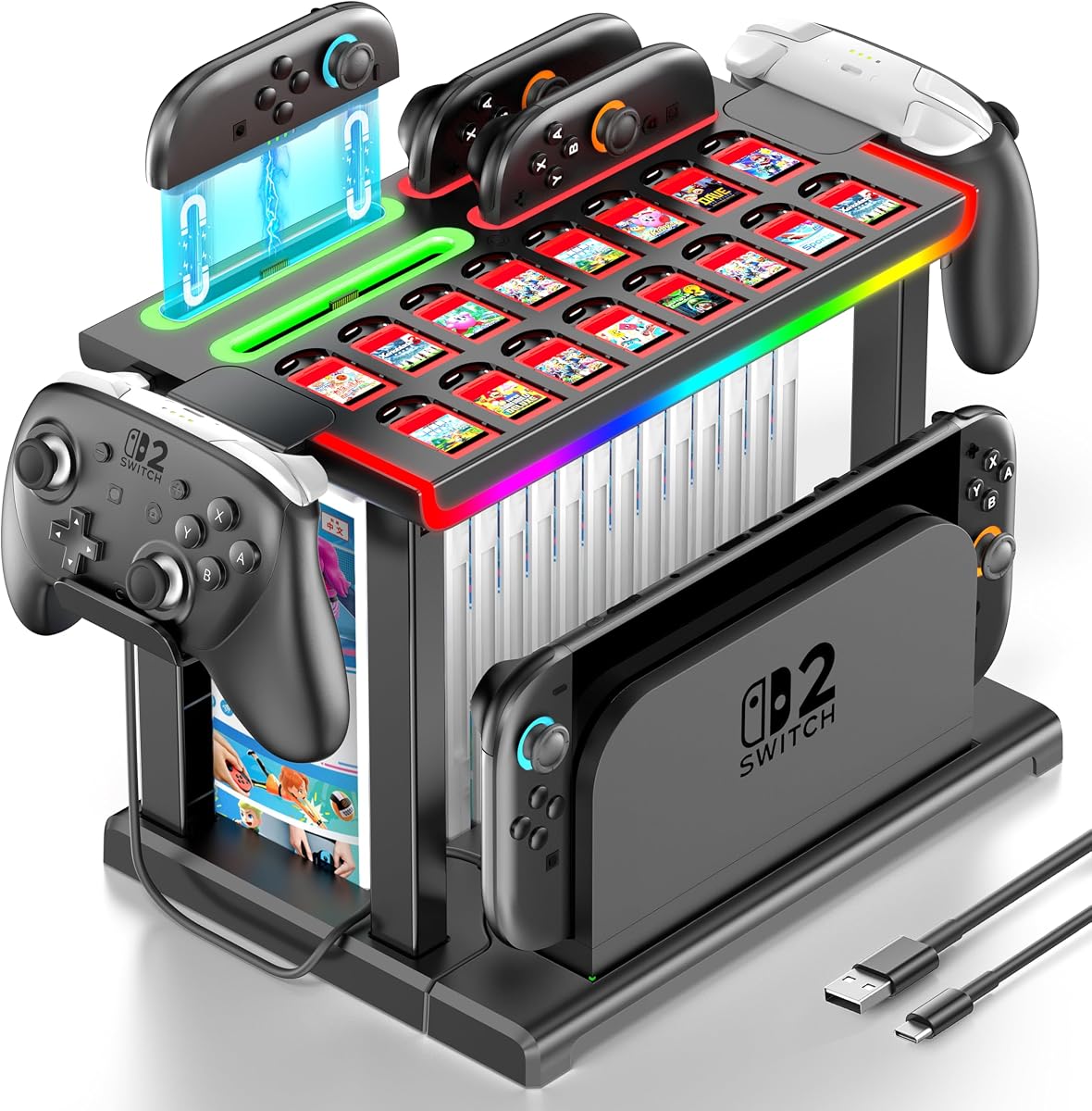


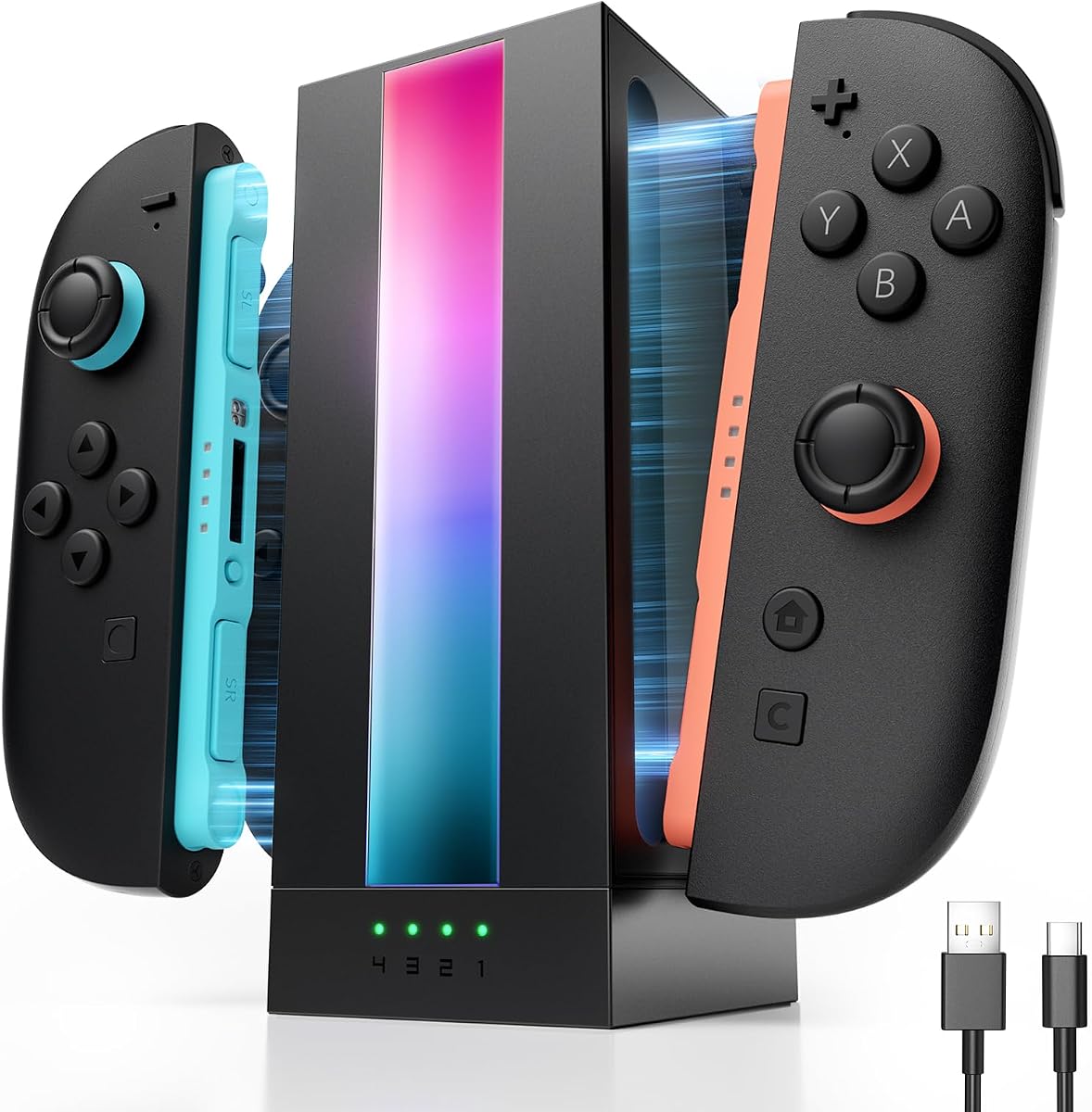
The FASTSNAIL Charging Dock stands out as a top contender for Switch 2 owners needing reliable power management. With a 4.7 rating from users, it delivers on its promise of magnetic alignment and fast charging capabilities for multiple joycons simultaneously.
We may earn a commission when you buy through this link, at no additional cost to you.
Its dual direction magnetic design ensures that joycons dock without needing to distinguish between plus and minus sides, significantly reducing wear on the charging ports. The ability to charge four controllers at once makes it ideal for multiplayer sessions where downtime must be minimized.
While the dock offers extensive features like nine RGB modes and clear indicators, users should note that the console and joycons are not included in the package. Additionally, you will need to source your own power adapter to utilize the full charging potential.
For gamers seeking a blend of convenience and aesthetic appeal, this dock provides excellent value. It is particularly suited for households with multiple players who need their controllers charged and organized efficiently without breaking the bank.
The magnetic dock reduces physical wear on controller ports by eliminating repeated plug and unplug actions during daily charging cycles.
Nine RGB lighting modes allow you to sync the dock aesthetics with your room setup or personal mood preferences effortlessly.
We may earn a commission when you buy through this link, at no additional cost to you.
SUPCASE delivers a premium charging experience with its dedicated dock for the 2025 Switch 2 Joy Con controllers. This model earns a 4.7 rating by combining robust safety features with a high capacity design that supports four joycons at once.
We may earn a commission when you buy through this link, at no additional cost to you.
The dual side charging capability is a standout feature that simplifies the docking process for users who might not align controllers perfectly. The magnetic design ensures secure placement while protecting the delicate charging ports from unnecessary strain and potential damage.
Despite its high quality construction, the dock does not include the controllers themselves, which is a standard omission for this category. The price point reflects its premium build and feature set, which might be a consideration for budget conscious buyers.
This dock is an excellent choice for serious gamers who prioritize safety and speed. Its built in smart chip protection prevents overcharging and overheating, ensuring your expensive controllers remain safe and functional for years to come.
The built in smart chip automatically detects charging status to prevent overcharging and overheating risks for your valuable controllers.
Four dedicated slots allow you to keep all family controllers powered up simultaneously during large group gaming nights.
We may earn a commission when you buy through this link, at no additional cost to you.
This Switch 2 Pro Controller Charging Station offers a straightforward and affordable solution for players who primarily use Pro Controllers. It receives a 3.5 rating but remains a viable option for those seeking basic functionality without extra bells and whistles.
We may earn a commission when you buy through this link, at no additional cost to you.
The dual charging capability ensures that two controllers can be powered up at the same time, reducing wait times between gaming sessions. The LED indicators provide clear visual feedback on charging status, making it easy to know when devices are ready to use.
Users should be aware that this station is designed specifically for Pro Controllers and may not support Joycons or other third party types. The rating suggests some variability in build quality or customer service experiences that potential buyers should consider carefully.
For budget conscious gamers who need a simple storage and charging spot for their main controllers, this stand delivers the basics effectively. It keeps the desktop tidy and ensures your Pro Controllers are ready for action whenever you sit down to play.
The compact design saves valuable desk space while providing reliable dual charging for two Pro Controllers at once.
LED indicators clearly show whether your controllers are charging or fully charged to prevent any power anxiety.
We may earn a commission when you buy through this link, at no additional cost to you.
The Switch 2 RGB Organizer Station combines storage and charging into a single comprehensive solution for dedicated fans. With a 4.6 rating, it offers extensive capacity for game cases and joycons while adding a decorative touch with RGB lighting.
We may earn a commission when you buy through this link, at no additional cost to you.
Its large capacity storage can hold sixteen game cards and sixteen game cases, keeping your entire library neatly arranged next to your console. The charging function supports four joycons at once, which is perfect for households where controllers are constantly being swapped out.
Assembly is tool-free, making setup quick and easy for anyone. However, the unit is fairly large and requires a significant amount of desk or shelf space to accommodate the game cases and controllers effectively.
This organizer is ideal for collectors who want to display their games alongside their charging station. The RGB lighting adds a nice aesthetic that enhances the gaming atmosphere, making it a functional piece of decor for your entertainment center.
Keep your games, cards, and controllers all in one place to reduce clutter and keep your gaming area neat.
RGB lighting modes sync with your gaming rhythm to create an immersive visual environment around your console setup.
We may earn a commission when you buy through this link, at no additional cost to you.
This versatile dock supports not only Switch Pro controllers but also PS5 and Xbox Series controllers, making it a universal solution for multi-console setups. It holds a 4.0 rating and focuses on stable charging through its 5V2A power recommendation.
We may earn a commission when you buy through this link, at no additional cost to you.
The dual port design allows you to charge two controllers at the same time, which is essential for co-op gaming. Removable Type-C adapters ensure that the dock fits various controller profiles without causing damage to the charging ports during insertion.
It is important to note that this station does not support PowerA or other third-party controllers, which may limit its utility if you own mixed brands. You will also need to provide your own wall adapter to achieve the recommended charging speed.
For gamers who own multiple console systems, this dock offers a practical way to manage power across different ecosystems. The smart protection chip adds peace of mind by monitoring power consumption and ensuring a safe charging environment for all connected devices.
Supports a wide range of controllers from different brands to simplify your charging needs if you own multiple consoles.
Removable Type-C adapters reduce wear on the controller ports by allowing for a direct and secure drop-in connection.
We may earn a commission when you buy through this link, at no additional cost to you.
This six in one charging station stands out for its ability to handle a variety of controller types including Joycons, Pro controllers, and even PS5 controllers. With a 4.7 rating, it offers impressive versatility for gamers with mixed controller collections.
We may earn a commission when you buy through this link, at no additional cost to you.
The fireproof panel design adds an extra layer of safety to the charging process, protecting your devices from potential heat related issues. You can power the dock via the game console, a USB hub, or a wall charger, giving you flexibility in how you set it up.
While the package includes a USB-C cable and promises a one year quality guarantee, it does not come with any controllers themselves. As a small business seller, the customer support experience may vary, but the product features remain competitive with larger brands.
If you need a single dock that can handle multiple controller types without buying separate units, this charger is a strong candidate. It simplifies your setup and ensures all your controllers stay charged using a reliable and safe charging system.
The fireproof panel design ensures safe charging conditions even during extended charging sessions or high power usage.
Connect to various power sources like a USB hub or console to fit different play environments without hassle.
We may earn a commission when you buy through this link, at no additional cost to you.
The PowerA Controller Charging Base is specifically designed to work seamlessly with PowerA wireless controllers and Joycons. It carries a 4.6 rating and offers a reliable way to keep your PowerA ecosystem powered without needing third-party compatibility.
We may earn a commission when you buy through this link, at no additional cost to you.
This base charges Joycons and wireless controllers at the same time, which streamlines your routine before starting a gaming session. The LED lights provide immediate visual feedback on the charging status, ensuring you never have to guess if a controller is ready.
While it is a solid option for PowerA users, it may not be compatible with other third-party brands, limiting its use to specific setups. The design is bold and eye-catching, but it lacks advanced features like RGB lighting or extensive storage found in premium models.
For those invested in the PowerA ecosystem, this base offers a straightforward and effective charging solution. It matches the aesthetic of your controllers and ensures they are ready to play whenever you are, without any complicated setup or configuration.
Designed specifically for PowerA wireless controllers to ensure a perfect fit and reliable charging performance every time.
Built in LED lights make it easy to see at a glance which controllers are charging or fully charged.
We may earn a commission when you buy through this link, at no additional cost to you.
The HEATFUN Switch Pro Controller Charger Dock features dual USB-C ports and supports various console controllers including Switch Pro and PS5. It has a 3.9 rating and focuses on providing a stable and efficient charging experience for your main gaming devices.
We may earn a commission when you buy through this link, at no additional cost to you.
The inclusion of USB-C adapters simplifies the charging process by allowing for drop-in connections without the need for cables every time. Its compact low-standby design fits neatly on desks or TV stands without taking up excessive space in your gaming area.
While it supports a broad range of controllers, it is not compatible with PowerA or some third-party options, which might be a limitation for some users. The LED indicators help monitor the charging status, but the rating suggests there may be some inconsistency in performance.
This dock is a practical choice for those who need a compact and straightforward way to charge multiple controllers. Its dual USB-C ports ensure you can keep two devices powered up simultaneously, reducing downtime and keeping your setup organized.
The low-standby design saves valuable desk space while maintaining a sleek look that blends with modern gaming setups.
USB-C adapters included ensure easy drop-in charging without damaging the controller ports during repeated use.
We may earn a commission when you buy through this link, at no additional cost to you.
FASTSNAIL offers a comprehensive 10-in-1 charging station that supports Switch 2, 1, and OLED models along with Joycons and Pro controllers. With a 4.2 rating, this unit is designed for households that need to charge a large number of devices at once.
We may earn a commission when you buy through this link, at no additional cost to you.
It features ten charging slots that can handle up to four joycons and two pro controllers simultaneously. The included Y-type cable is recommended for connection to the official dock, ensuring stable power delivery even when multiple devices are charging together.
The dock includes extra USB ports for data transfer or charging other devices, making it a multi-functional hub. However, its large size might take up significant space, and users should be prepared for the physical dimensions when placing it on a desk.
For families or group gamers, this station is an all-in-one solution that simplifies power management. The extensive RGB modes add a fun visual element, and the smart protection chip helps ensure all connected devices are charged safely and efficiently.
Ten charging slots allow you to keep every controller in the household powered up without needing multiple stations.
Included USB ports provide additional space for connecting other devices or transferring data directly from the dock.
We may earn a commission when you buy through this link, at no additional cost to you.
The JSAUX EnergyFlow JoyCon Charging Dock is designed exclusively for the 2025 Switch 2 JoyCon controllers. It holds a 4.3 rating and claims to be significantly more efficient than previous models, charging all four joycons in just about 2.5 hours.
We may earn a commission when you buy through this link, at no additional cost to you.
Its immersive RGB lighting bar adds a modern touch to your gaming setup and can be controlled with a one-touch button. Each port has an independent LED indicator, allowing you to monitor the status of each joycon individually without confusion.
One notable limitation is that it does not work with the older Switch or OLED version JoyCons, so compatibility is specific to the new generation. Additionally, the power adapter is not included in the package, so you will need to source one separately.
If you are looking for a fast and stylish solution specifically for Switch 2 JoyCons, this dock delivers. Its smart safety features protect against overcharging and overheating, ensuring your controllers stay safe while reducing wait times between play sessions.
Up to 30% more efficient charging reduces wait times during multiplayer sessions and keeps your games running smoothly.
Independent LED indicators for each port show the exact charging status of every joycon at a glance.
We may earn a commission when you buy through this link, at no additional cost to you.
Selecting the right charging dock involves evaluating several key factors to ensure it meets your specific gaming needs and budget.
Ensure the dock explicitly supports your specific controller models such as Switch 2 Pro or Joycons. Some docks are limited to official controllers while others support third-party options.
Always check the product description for compatibility lists to avoid purchasing a dock that does not fit your devices.
Look for docks that support fast charging standards like 5V2A to reduce wait times between sessions. The number of ports determines how many controllers you can charge simultaneously.
Dual or quad port docks are ideal for households with multiple players who need to keep several controllers powered at once.
Safety features such as smart chips that prevent overcharging and overheating are essential for protecting your valuable controllers. These features extend battery lifespan and ensure a safe charging environment.
Prioritize docks with built-in safety mechanisms to avoid potential damage to your devices from electrical issues.
Consider the physical footprint of the dock and whether it fits comfortably on your desk or shelf. Compact designs save space while larger organizers might offer additional storage for game cases.
Choose a size that matches your available space and aesthetic preferences for a tidy gaming setup.
Extra features like RGB lighting, storage slots, or USB ports can add value and enhance your gaming experience. These features personalize your setup but may increase the price point.
Decide if these additions are worth the extra cost based on your personal preferences and organizational needs.
Check whether the dock includes a power adapter or if you need to purchase one separately. Some docks can draw power from a console or USB hub which adds flexibility.
Ensure you have the necessary power supply available to avoid unexpected delays in setting up your charging station.
User friendly designs with clear indicators and simple docking mechanisms make daily use more convenient. Look for docks with touch controls or simple buttons to switch modes.
A straightforward interface reduces frustration and ensures that anyone can use the dock effectively without confusion.
A solid warranty and responsive customer support can provide peace of mind in case of defects or issues. Check the terms of the warranty before purchasing to understand coverage limits.
Reliable support ensures that you can resolve any problems quickly and maintain the longevity of your charging station.
Place the dock on a stable and flat surface near your gaming area to avoid cable strain. Ensure the area is well ventilated to prevent overheating during long charging sessions.
Insert controllers carefully into the slots ensuring they are aligned correctly with the charging contacts. If your dock uses magnetic alignment, simply drop the controllers in without forcing them.
Regularly clean the charging contacts on both the dock and the controllers with a dry cloth to maintain efficient power transfer. This simple step prevents dirt buildup that could lead to charging issues over time.
Not all docks are compatible across generations. Some docks explicitly state support for both Switch 1 and Switch 2 models while others are designed exclusively for the new controllers. Always check the product description to confirm compatibility before purchasing to ensure it works with your devices.
Charging times vary by model but typically range from 2.5 to 3.5 hours for a full charge. Faster docks with higher power input like 5V2A can reduce this time significantly. Check the product specifications for exact charging duration estimates.
Most modern docks have smart safety chips that prevent overcharging and stop power flow when the battery is full. However, it is still good practice to unplug the dock when not in use to extend its lifespan and save energy.
Some docks come with a USB cable but require you to provide your own power adapter. Always check the package contents listed in the product description to see if an adapter is included or sold separately.
Many versatile docks support charging multiple controller types simultaneously but you should verify specific slot types. Some docks are designed for specific controller shapes so ensure it has the right slots for both Joycons and Pro controllers.
Magnetic charging allows for easy alignment and reduces wear on the charging ports from repeated plugging. It provides a secure hold and ensures a stable connection without the need to force the controller into the slot.
Support for third-party controllers varies widely by brand and model. Some docks explicitly exclude brands like PowerA while others support a wide range of compatible devices. Always check the compatibility list in the product details.
Most docks use LED indicators to show charging status such as red for charging and green for fully charged. Some models provide independent indicators for each port so you can monitor multiple controllers at once.
We have reviewed the top ten Controller Charging Dock for Switch 2 options available in the market today ranging from budget-friendly stations to premium multi-functional organizers. Each product offers unique features such as magnetic alignment, RGB lighting, and multi-device compatibility.
When selecting the right dock for your needs consider factors like compatibility, charging speed, and safety features carefully. Determine how many controllers you need to charge simultaneously and whether additional storage or lighting features are important to your setup.
Prices and availability can change frequently so please check current details before making your final purchase. Choosing the right dock ensures your controllers are always ready for play and keeps your gaming area organized and tidy.