
ASUS Prime AP201 Micro-ATX PC Case
4.7Editor score
Quasi-filter mesh panels design
Optimized for high cooling
Tool-free side panels removal
This guide compares the top ASUS PC Case models for performance and cooling to help you find the perfect chassis for your custom gaming or workstation build
Choosing the right chassis is critical for any custom build. A high quality case ensures proper airflow and protects your expensive components from dust and damage while offering a clean aesthetic.
We analyzed ten distinct ASUS PC Case models focusing on build quality, cooling potential, and ease of installation. Each entry offers unique features tailored to different budget levels and component sizes.
This list highlights standout picks based on ratings and specs. Note that availability and pricing shift frequently so check current listings before making your final purchase decision online.
4.7Editor score

4.8Editor score

4.6Editor score
This side-by-side comparison covers all ten models to help you quickly identify the best fit for your specific hardware needs and aesthetic preferences.


The ASUS TUF Gaming GT501 stands out as a robust full-tower case designed for serious builders. With a 4.8 rating it delivers excellent performance and style in equal measure. Its custom TUF spatter pattern and smoked tempered glass panel make it a standout on any desk.
We may earn a commission when you buy through this link, at no additional cost to you.
This model supports EATX motherboards and features pre-installed Aura Sync RGB fans for immediate visual appeal. The three 120mm front fans and one 140mm rear fan ensure strong airflow. Liquid cooling is well supported with space for 360mm radiators up the front or top.
While the case is sturdy it adds significant weight making it less ideal for frequent movers. The pre-installed fans are functional but might need replacement for silent operation. Still these trade-offs are minor compared to the overall value and feature set offered.
Buyers seeking a reliable full-tower for high-end gaming rigs should consider this model. It balances performance and aesthetics effectively. The ergonomic carry handles help manage the weight when needed. This case is a top recommendation for those who want a durable and stylish chassis.
The chassis supports up to seven fan-mounting points and includes three 120mm Aura Sync RGB fans out of the box.
Support for top or front mounted 360mm radiators and pre-drilled water pump holes make custom loops easy to install.
We may earn a commission when you buy through this link, at no additional cost to you.
The ASUS Prime AP201 offers exceptional value for budget-conscious builders who still want premium features. Its quasi-filter mesh panels provide over 57000 holes for maximum airflow. This design ensures components stay cool even under heavy load without needing extra fans.
We may earn a commission when you buy through this link, at no additional cost to you.
Despite a 33L footprint the case supports ATX PSUs up to 180mm long and graphics cards up to 338mm. The tool-free side panels simplify assembly and maintenance. Cable management is handled well with an extended motherboard tray and strategically placed cutouts.
The compact size means some larger GPUs might not fit depending on the model. Materials are functional but lack the premium feel of higher-end cases. These limitations are acceptable given the price point and the thermal performance it delivers.
For small form factor builds or tight budgets this case is an excellent choice. It offers industry-leading spatial efficiency that maximizes internal space. The clip mechanism for side panels is secure yet easy to remove. This model is highly recommended for efficient and affordable builds.
The mesh design comprises over 57000 precision-machined holes to increase airflow and show components clearly.
Despite a 33L footprint it supports ATX PSUs up to 180mm long and graphics cards up to 338mm long.
We may earn a commission when you buy through this link, at no additional cost to you.
The ASUS ROG Hyperion GR701 is a flagship case designed for high-end enthusiasts who demand the best. Its sturdy diecast aluminum-alloy frame offers unmatched durability and style. The semi-open structure improves airflow significantly allowing support for massive 420mm radiators for extreme cooling needs.
We may earn a commission when you buy through this link, at no additional cost to you.
Convenience features include a built-in graphics card holder that supports both vertical and horizontal installations. Two front panel Type-C ports with 60W fast charge support keep devices powered and data transfer fast. The tool-free side panels make accessing components quick and easy.
The high price may be a barrier for average buyers but the features justify the cost for professionals. The large size means it requires a spacious desk or dedicated setup. These factors are minor compared to the premium experience and performance it delivers.
Enthusiasts building a top-tier gaming rig should look no further than this model. It combines style convenience and performance in one package. The top bars double as carry handles capable of supporting up to 80KG. This case is the ultimate choice for those seeking a premium build.
The semi-open structure supports up to 2 x 420mm radiators for large AIOs or custom water cooling.
Built-in graphics card holder supports both vertical and horizontal installations for flexible display options.
We may earn a commission when you buy through this link, at no additional cost to you.
The ASUS TUF Gaming GT502 Horizon brings a boundless panoramic design with tempered and tinted glass panels at the front and side. This offers a fully unobstructed view of the main chamber making internal components the centerpiece. The dual-chamber chassis establishes independent cooling zones for CPU and graphics cards.
We may earn a commission when you buy through this link, at no additional cost to you.
The front panel features a USB 10 Gbps Type-C port for high-speed data transfer which is a modern convenience. Tool-free side panels allow easy removal by pressing a button hidden on the rear. The modular design means most panels and mounting components are detachable to streamline hardware installation.
Glass panels require careful handling to avoid fingerprints or scratches during cleaning. The dual-chamber design might complicate cable management for beginners. These challenges are manageable with patience and the result is a stunning and functional build environment.
This case is perfect for builders who prioritize aesthetics without sacrificing cooling efficiency. The independent cooling zones help maintain optimal thermal performance. The USB-C port ensures compatibility with modern devices. Consider this model for a stylish and innovative chassis.
GT502 Horizon internals are divided into two chambers establishing independent cooling zones for the CPU and graphics cards.
Most of the panels and mounting components are detachable to streamline hardware installation and maintenance.
We may earn a commission when you buy through this link, at no additional cost to you.
The ASUS A31 PLUS is designed specifically for motherboards featuring hidden connectors to optimize cable management. This ensures a clutter-free setup that looks professional and clean. It comes with four pre-installed ARGB fans that deliver effective cooling and a mesmerizing display of vibrant lighting.
We may earn a commission when you buy through this link, at no additional cost to you.
Its panoramic design features dual tempered glass panels on the front and side for unobstructed views. The 8-degree angled base enhances airflow efficiency and widens the viewing angle for a more immersive experience. It supports up to 360mm radiators and graphics cards up to 380mm.
The rating is lower than others suggesting some users may find specific features lacking. Cable management while improved by hidden connectors still requires careful routing for best results. These issues are minor given the unique features and visual appeal provided.
If you have a motherboard with hidden connectors this case will maximize your setup's potential. The angled base improves airflow which benefits thermal performance. The pre-installed fans save time and add aesthetic value. Consider this model for a clean and modern build.
Built for motherboards featuring hidden connectors to optimize cable management for a clutter-free setup.
The 8-degree angled base enhances airflow efficiency and widens the viewing angle for a more immersive experience.
We may earn a commission when you buy through this link, at no additional cost to you.
The ASUS TUF Gaming GT501 White Edition brings a unique white finish to the popular GT501 series. It features a custom TUF Gaming spatter pattern on the metal front panel which makes it stand out from generic white cases. The build quality matches the black version with robust panels and sturdy construction.
We may earn a commission when you buy through this link, at no additional cost to you.
It includes ergonomic woven-cotton carry handles enabling easy and safe transport up to 30Kg. This makes it a true mobile battle station for LAN parties or relocation. The three 120mm Aura Sync RGB-illuminated fans and one 140mm rear PWM fan provide efficient cooling.
White surfaces show dust and fingerprints more easily requiring frequent cleaning. The carry handles add utility but contribute to the overall weight. These are minor inconveniences for those who prioritize a white gaming aesthetic and portability.
For builders wanting a clean white look with gaming flair this case is ideal. The RGB fans and custom pattern add personality. The handles make it easier to move. This model is a top choice for white themed gaming PCs.
Ergonomic woven-cotton carry handles enable easy and safe transport up to 30Kg.
Equipped with three 120mm Aura Sync RGB-illuminated fans and one 140mm rear PWM fan plus up to seven fan-mounting points.
We may earn a commission when you buy through this link, at no additional cost to you.
The ASUS TUF Gaming GT301 is a compact case that fits into tight spaces without compromising style. It features a perforated honeycomb front panel to aid airflow and showcases the build through a tempered-glass side panel. Three 120mm Aura Sync addressable RGB-illuminated fans come pre-installed.
We may earn a commission when you buy through this link, at no additional cost to you.
An integrated 6 port Aura Sync addressable-RGB controller hub allows for stunning lighting effects via a front panel button. It supports 280/360mm water-cooling radiators in front and includes a headphone hanger for convenience. The compact size makes it easy to fit on small desks.
Internal space is limited compared to full towers so cable management requires care. The size might restrict some larger components or storage drives. These limits are expected for a compact build and suit small form factor needs well.
Gamers with limited desk space should find this case very suitable. The RGB controller simplifies lighting setup. The headphone hanger adds practical value. This model is great for efficient and compact gaming setups.
Integrated 6 ports Aura Sync addressable-RGB controller hub and a dedicated front panel control button to create a stunning lighting effect.
Space reserved for 280/360mm water-cooling radiators in front and 120mm at rear for efficient cooling.
We may earn a commission when you buy through this link, at no additional cost to you.
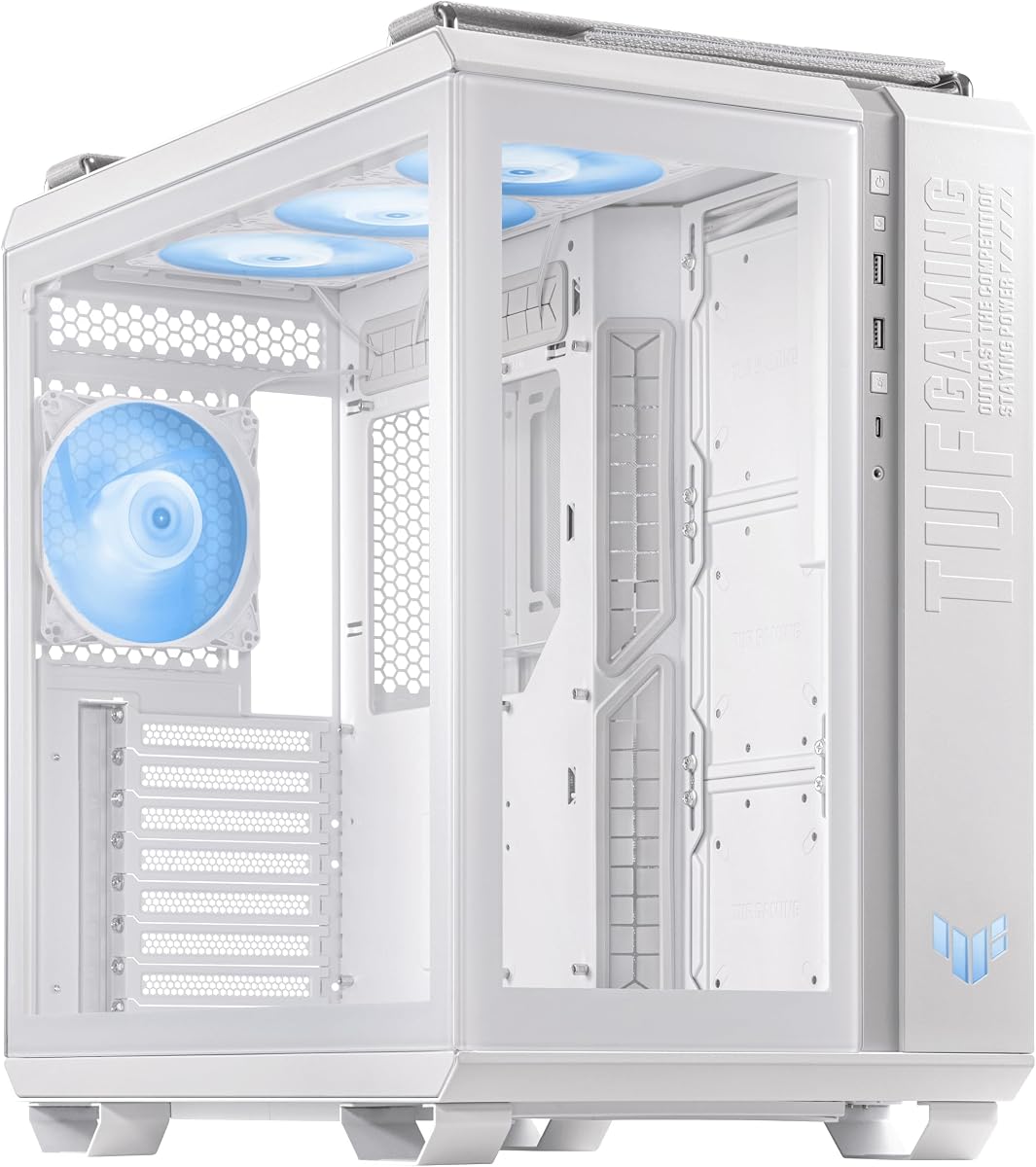
The ASUS TUF Gaming GT502 Horizon ARGB brings the panoramic design to a clean white aesthetic. The interior is divided into two chambers forming independent cooling zones for the CPU and graphics card. Tempered and tinted glass panels provide a completely unobstructed view of the main chamber.
We may earn a commission when you buy through this link, at no additional cost to you.
Four pre-installed ARGB fans ensure balanced cooling performance with vivid lighting effects. The front panel features a USB 20Gbps Type-C port for high-speed storage data transfer. Most panels and mounting hardware are removable to simplify hardware installation and maintenance.
White glass can show smudges more than darker glass requiring regular cleaning. The dual chamber design might require careful planning during cable management. These are minor issues that do not outweigh the visual and functional benefits.
For a white gaming rig with excellent visibility this case is a strong option. The high-speed USB-C port supports modern peripherals. The modular design aids installation. This model is recommended for those wanting a stylish white build.
The interior is divided into two chambers that form independent cooling zones for the CPU and graphics card.
Front Panel features a USB 20Gbps Type-C port for high-speed storage transfers.
We may earn a commission when you buy through this link, at no additional cost to you.
The ASUS A31 Plus TG ARGB is built for motherboards with concealed connectors to optimize cable management for a clutter-free setup. It features tempered glass panels on the front and sides providing an unobstructed view of the main chamber. The 8-degree angled base combines functionality and aesthetics.
We may earn a commission when you buy through this link, at no additional cost to you.
The angled base improves airflow efficiency for better thermal performance while increasing the viewing angle for a more intense experience. It supports graphics cards up to 380mm and CPU air coolers up to 165mm high. This makes it compatible with a wide range of components.
The specialized layout might require specific motherboards to fully utilize features. Cable management still needs care despite the hidden connectors. These considerations ensure a clean build when done correctly and are worth the effort.
This case is perfect for enthusiasts wanting a wide view and improved airflow. The angled base adds a unique look and functional benefit. It supports large GPUs for top-tier graphics. Consider this model for a clean and angled design.
Built for motherboards with concealed connectors to optimize cable management for a clutter-free setup.
The 8-degree angled base combines functionality and aesthetics improving airflow efficiency and increasing the viewing angle.
We may earn a commission when you buy through this link, at no additional cost to you.
The ASUS TUF Gaming GT502 Plus features a dual-chamber design that configures independent cooling zones for the CPU and GPU. This helps maintain stable temperatures during intensive workloads. It offers a panoramic view with tempered glass panels at the front and side.
We may earn a commission when you buy through this link, at no additional cost to you.
The front panel includes a USB 32 Gen 2 Type-C port ripe for transfer speeds up to 10 Gbps. Tool-free side panels can be removed simply by pressing a button hidden on the rear. The fully modular design means most panels and mounts are removable to ease hardware installation.
White panels may need more cleaning to maintain their appearance. The mid tower form factor limits size for large custom water loops. These are minor trade-offs given the features and cooling performance provided.
For a white dual-chamber case with modern USB-C speeds this model fits well. The tool-free panels simplify maintenance. The panoramic view showcases components clearly. This case is a solid choice for stylish and efficient builds.
GT502 internals are divided into two chambers configuring independent cooling zones for the CPU and GPU.
Front Panel features a USB 32 Gen 2 Type-C port ripe for transfer speeds up to 10 Gbps.
We may earn a commission when you buy through this link, at no additional cost to you.
Selecting the right ASUS PC Case involves balancing performance features and aesthetics. Here are key factors to consider for your build.
Check the case supports your motherboard type whether EATX ATX Micro-ATX or Mini-ITX. Most top models support EATX or ATX but verify dimensions to ensure fit.
Verify the case supports your motherboard type before purchasing to avoid compatibility issues.
Evaluate the case for pre-installed fans and support for additional fans or radiators. Higher-end models support 360mm or even 420mm radiators for liquid cooling.
Check fan and radiator support to ensure your components stay cool under load.
Steel and aluminum offer durability while tempered glass provides a premium look. Diecast aluminum frames like in the Hyperion GR701 are more robust than standard steel.
Choose materials that match your durability and aesthetic needs.
Look for extended motherboard trays and ample cable routing holes. Cases with hidden connector support allow for cleaner setups with less clutter.
Prioritize cable management features to keep internal components organized.
Decide between panoramic glass panels mesh fronts or solid doors. Panoramic designs show off components while mesh fronts maximize airflow.
Select a design that matches your visual preferences.
Check for USB 3.2 or Type-C ports on the front panel. USB-C ports with high-speed data transfer are increasingly useful for modern peripherals.
Ensure front I/O matches your connection needs.
Full-towers offer more space but are heavier and require larger desks. Compact models like the AP201 fit smaller spaces but limit component size.
Measure your workspace before choosing a full tower or compact case.
Cases with pre-installed RGB fans or Aura Sync controllers simplify lighting. Look for added features like headphone hangers or tool-free side panels for convenience.
Consider extra features that improve user experience.
Always read the manual before assembly to understand tool-free mechanisms and panel clips. This prevents damage to hinges or locks when removing side panels.
Keep dust filters clean by removing them and washing gently. Dust buildup reduces airflow and increases internal temperatures over time.
When moving the case use any ergonomic handles provided. Secure cables to avoid strain during transport.
The GT501 is a mid-tower with support for E-ATX motherboards. It also accommodates standard ATX and Micro-ATX boards comfortably.
The AP201 does not come with pre-installed fans. It supports up to six fans for optimized cooling depending on your setup.
Yes the GR701 supports up to 2 x 420mm radiators due to its semi-open structure designed for extreme cooling needs.
Many models like the GT502 Horizon and GR701 feature USB Type-C ports. Check specific specs for speed and power support.
Most models including the GT501 and GT502 feature tool-free side panels. Simple clip or button mechanisms allow easy access without tools.
Yes several models support custom loops with water pump and reservoir mounting holes. Verify radiator space and mount compatibility.
This guide highlights ten outstanding ASUS PC Case models from the GT501 to the ROG Hyperion GR701. Each offers unique strengths whether you prioritize airflow design or premium materials.
Prioritize your needs by choosing a size that fits your components and supports your cooling plans. Consider aesthetics like RGB or glass panels to match your setup.
Always check current prices and availability before purchasing as they change frequently. Use the provided links to find the best deal for your chosen model today.