
Cooler Master Q300L V1
4.5Editor score
Compact Micro-ATX form factor
Transparent side panel visibility
Modular I/O panel placement
This guide compares the best horizontal PC cases for home theater and desktop setups, evaluating cooling, GPU support, and build quality to help you find the
Horizontal PC cases offer a sleek and space-saving design perfect for home theater setups and compact desktops. They allow users to place their computer under a monitor or within an entertainment cabinet while maintaining strong performance capabilities for gaming and media consumption.
We evaluated ten top models based on airflow efficiency, motherboard compatibility, and aesthetic appeal. Our analysis considers real-world usage scenarios including silent operation, dust filtration, and support for high-end graphics cards without compromising on the horizontal footprint.
Each pick highlights unique strengths such as wood finishes, modular I/O panels, or specific radiator support. Please note that availability and pricing change frequently, so verify current stock before purchasing to ensure you get the best deal available today.
4.5Editor score

4.8Editor score

4.5Editor score
Below is a side-by-side comparison of the ten selected horizontal PC cases. Each entry details key specifications like GPU clearance, motherboard support, and unique features to help you decide which model fits your specific build requirements.


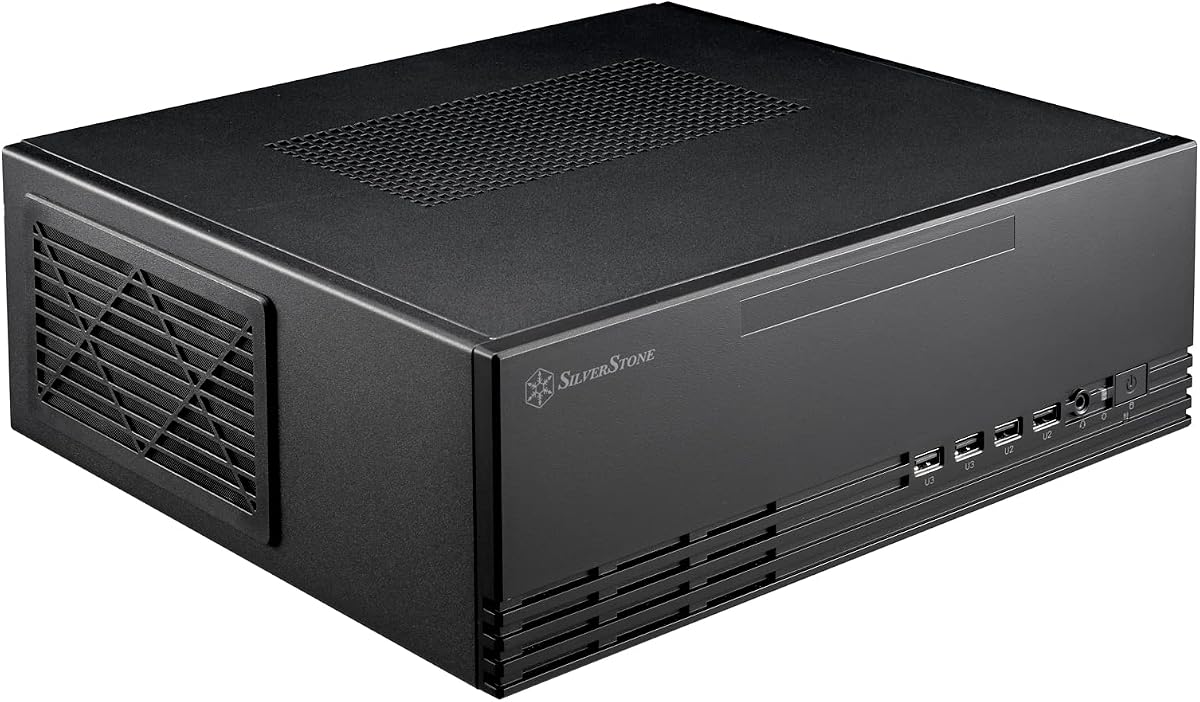
The Silverstone GD09 stands out as a top choice for home theater builds. It receives high ratings for its silent operation and positive air pressure design which keeps dust out. This case supports ATX boards and fits comfortably in cabinets.
We may earn a commission when you buy through this link, at no additional cost to you.
Its faux aluminum design mimics high-end audio equipment. The positive pressure setup ensures that air flows correctly to cool components without sucking in dust. This makes it ideal for living room setups where noise and cleanliness matter.
While it is heavier than plastic options the build quality justifies the weight. The deep internal space allows for standard graphics cards without modification. Filters are easy to access for cleaning which maintains performance over time.
Buyers looking for a reliable HTPC chassis should consider this model. It balances aesthetics with performance well. Ensure your power supply fits the vertical orientation before purchasing to avoid compatibility issues during installation.
The positive air pressure design prevents dust buildup while maintaining low noise levels.
Faux aluminum finish helps the PC blend seamlessly with entertainment center equipment.
We may earn a commission when you buy through this link, at no additional cost to you.
The Cooler Master QUBE 540 offers exceptional value with its flexible orientation design. Users can switch between horizontal and vertical setups easily. This versatility makes it a great pick for changing desk layouts over time.
We may earn a commission when you buy through this link, at no additional cost to you.
It supports large graphics cards up to 415mm without removing fans. The full mesh front ensures adequate airflow even with powerful hardware. This balance of size and cooling is rare at this price point.
The reversible I/O panel adds convenience for cable management. USB Type-C connectivity is a nice addition for modern peripherals. However the tempered glass side panel requires careful handling to prevent breakage.
For those needing a versatile case without breaking the bank this is a strong contender. It accommodates most standard ATX builds well. Check your specific motherboard dimensions to confirm fit before ordering online.
Reversible I/O and movable handles allow easy switching between horizontal and vertical setups.
Full mesh front panel maximizes intake air for better thermal performance under load.
We may earn a commission when you buy through this link, at no additional cost to you.
The Silverstone Grandia 11 is designed specifically for high-end home theater PCs. Its stereo-shaped chassis looks elegant in media centers. It supports ATX boards while keeping a compact footprint for hidden setups.
We may earn a commission when you buy through this link, at no additional cost to you.
Positive air pressure helps keep internal components clean and cool. The fully meshed front panel provides large surface area for air intake. This ensures heat is expelled efficiently even with radiators installed.
Users appreciate the adjustable LED indicator for status checks. The build materials feel solid and premium compared to budget cases. However the depth limits some larger power supply units which may need consideration.
Ideal for audiophiles or media enthusiasts wanting a silent system. The price reflects the specialized design and quality. Verify your power supply dimensions to ensure it fits within the chassis limits.
The unique shape and finish help the PC match high-end audio components perfectly.
Meshed front and positive pressure system work together to maintain low noise and temps.
We may earn a commission when you buy through this link, at no additional cost to you.
The Lian Li B4-mATX brings natural wood finishes to PC cases. Available in black walnut or white beech it adds warmth to any room. It supports mATX motherboards and fits GPUs up to 358mm easily.
We may earn a commission when you buy through this link, at no additional cost to you.
It comes with slim fans for immediate cooling upon unboxing. The dual positioning feature allows horizontal or vertical use. This makes it versatile for both desk tops and shelves.
While airflow is decent it lacks the mesh openness of gaming cases. The wood finish requires gentle cleaning to avoid scratches. It is best for office or home office environments rather than high gaming.
This model is a standout for visual appeal. It merges craftsmanship with tech effectively. Ensure you have space for the dimensions and check PSU compatibility before finalizing your build.
Premium real wood panels give the case a sophisticated look unlike standard steel cases.
Switch between horizontal and vertical orientations without needing extra mounting parts.
We may earn a commission when you buy through this link, at no additional cost to you.
The Cooler Master Q300L V1 is a budget-friendly option for Micro-ATX builds. It offers ample interior space for expansion and future upgrades. The transparent side panel lets you showcase your components beautifully.
We may earn a commission when you buy through this link, at no additional cost to you.
Its modular I/O panel allows flexible placement at front top or bottom. This helps with cable management and accessibility. The magnetic dust filters are easy to remove and clean regularly.
While it is affordable it uses thinner materials than premium cases. The PSU length limit of 160mm might restrict some larger units. Still it provides great value for small form factor enthusiasts.
Recommended for those starting a build on a tight budget. It supports standard components well without sacrificing style. Check your PSU dimensions to ensure it fits within the 160mm limit.
Move the input panel to different sides for better cable management in tight spaces.
High features at a low price point make this a great entry-level horizontal case.
We may earn a commission when you buy through this link, at no additional cost to you.
The Shiny Snake G300 is built for LAN parties and travel. It features a military-grade handle rated for 30kg load. This makes carrying your rig to tournaments safe and easy.
We may earn a commission when you buy through this link, at no additional cost to you.
Its aluminum mesh chassis reduces dust intake significantly. The horizontal PSU placement prevents cable interference. This design supports powerful GPUs up to 340mm in length.
While portable the structure is less rigid than fixed desktop cases. Ensure components are secured well before moving the case. It is ideal for users who frequently transport their PCs.
Buyers needing portability will find this case unique. The mesh design keeps cooling effective. Check if your GPU fits within 340mm limits before purchasing to avoid fit issues.
Robust handle and vibration-dampened base protect components during transport.
Full mesh side panels maintain airflow in a small 16.8L chassis.
We may earn a commission when you buy through this link, at no additional cost to you.
The Lian Li A3-mATX excels in airflow and hardware support. It fits GPUs up to 415mm and radiators up to 360mm. The steel mesh panels maximize air movement for better cooling.
We may earn a commission when you buy through this link, at no additional cost to you.
Its modular structure with a wood front panel looks stylish. It supports ATX and SFX power supplies with flexible orientations. This flexibility helps manage cables more efficiently inside.
Assembly can be more involved due to the modular parts. The high rating reflects its superior performance capabilities. It is a great choice for high-end builds needing room to expand.
For advanced users wanting performance and style this is ideal. The balance of clearance and aesthetics is hard to beat. Ensure you have space for the radiator if planning liquid cooling.
Accommodates massive GPUs and radiators without compromising the compact footprint.
Stylish wood front panel adds a premium touch to the industrial mesh design.
We may earn a commission when you buy through this link, at no additional cost to you.
The Silverstone GD09B-C adds a USB Type-C port to the classic GD09. This modernizes the HTPC setup for faster data transfers. It keeps the positive air pressure design for quiet and clean cooling.
We may earn a commission when you buy through this link, at no additional cost to you.
It supports ATX and Micro-ATX motherboards effectively. The depth allows for standard GPUs and components. This version is perfect for users needing modern connectivity options.
The faux aluminum design still blends well with living rooms. Filters are quick to access for maintenance. However the lack of more front ports might be a limitation for some.
Ideal for media centers needing USB-C convenience. The build quality ensures longevity and low noise. Verify your components fit the depth before purchase to avoid issues.
USB Type-C front port supports fast external drives and modern peripherals easily.
Maintains the proven quiet airflow of the GD09 series with updated features.
We may earn a commission when you buy through this link, at no additional cost to you.
The Silverstone GD09B offers a traditional HTPC design without extra ports. It supports ATX motherboards with 358mm depth capacity. This allows for standard expansion cards without issues.
We may earn a commission when you buy through this link, at no additional cost to you.
Positive air pressure ensures quiet and dust-free operation. The faux aluminum finish suits entertainment cabinets well. Quick access filters simplify regular cleaning tasks.
While it lacks modern USB Type-C it remains reliable. The depth is great for most graphics cards. It is a solid pick for basic media center setups.
Recommended for users prioritizing silence and simplicity. Check your power supply fit since the vertical orientation is fixed. Ensure your GPU fits the depth before installing.
Positive pressure design keeps dust out while maintaining low noise levels.
Deep chassis allows for full-size graphics cards and other expansion components.
We may earn a commission when you buy through this link, at no additional cost to you.
The Silverstone Milo 11 is one of the slim micro-ATX cases available. It fits easily on desks or within cabinets. It supports TFX power supplies which are standard for this form factor.
We may earn a commission when you buy through this link, at no additional cost to you.
It can be oriented horizontally or vertically for flexibility. The slim depth helps it fit under monitors easily. This makes it great for office or minimal setups.
Cooling is limited due to the compact volume. You must use a TFX PSU which may have lower wattage. Check your GPU and PSU compatibility carefully.
Ideal for users needing a minimal footprint. It is a niche choice for specific constraints. Ensure you have space for the TFX power supply before purchasing.
Ultra slim design saves significant desk space for office environments.
Use horizontally or vertically depending on your space needs.
We may earn a commission when you buy through this link, at no additional cost to you.
Selecting a horizontal PC case requires balancing physical dimensions with thermal and performance needs.
Check that the case supports your motherboard size whether it is Mini-ITX Micro-ATX or ATX. Some cases only fit smaller boards so verify the internal dimensions before buying.
Ensure the case lists support for your specific motherboard size in the specs.
Measure your graphics card length and compare it to the case depth specs. Some cases allow for longer cards without removing fans which is crucial for modern GPUs.
Look for cases listing at least 350mm clearance for future-proofing.
Some cases require specific power supply types like TFX or SFX instead of standard ATX. Confirm your power supply size fits the internal layout to avoid conflicts.
Check the manufacturer notes on PSU support before purchasing.
Horizontal cases need good airflow to prevent heat buildup. Mesh panels and positive air pressure designs help keep components cool during use.
Prioritize models with full mesh fronts for better performance.
Dust filters are essential for maintaining airflow and reducing noise over time. Look for cases with easy-to-remove filters for regular cleaning.
Magnetic filters are often easier to manage than sliding ones.
Modern builds often need USB Type-C ports for fast data transfer. Ensure the case includes enough ports for your peripherals and drives.
Check the I/O panel layout on the product page.
The finish should match your setup whether it is aluminum wood or tempered glass. Choose a style that fits your room's decor for better integration.
Wood and aluminum look best in living room setups.
Some cases offer both horizontal and vertical modes via reversible panels. This adds versatility if your setup changes over time.
Verify if extra parts are needed for vertical mounting.
Place the case on a stable flat surface that supports its weight. Ensure there is at least a few inches of clearance on all sides for airflow.
Use the included magnetic filters to catch dust before it enters the case. Clean these filters every month with a soft brush or vacuum.
Secure cables using the internal routing guides to prevent airflow obstruction. Regularly check screws and mounts to ensure components stay tight during use.
A horizontal PC case is designed to sit flat like a book rather than standing upright. This form factor is ideal for media centers where the PC needs to fit under a monitor or cabinet.
Many models support GPUs up to 350mm or more in length. Always verify the depth specifications against your graphics card dimensions to ensure it fits without blocking other ports.
Horizontal cases often have restricted space so proper airflow prevents heat buildup. Mesh panels and strategic fan placement help maintain performance and longevity.
Not all cases require TFX power supplies. Many support standard ATX or SFX units. Check the manual for PSU compatibility before buying a specific case.
Use magnetic filters and clean them regularly. Place the case away from carpeted areas to reduce dust intake. Vacuum the interior annually to maintain cooling.
Yes but height clearance is often limited. Check the case specs for max CPU cooler height to avoid obstruction issues with the side panel.
We highlighted ten top models ranging from budget to premium options. The Silverstone GD09 and Lian Li A3-mATX stood out for overall balance.
Prioritize airflow and GPU clearance when choosing for performance. Consider aesthetics if the PC will be visible in your living room.
Prices and stock change frequently so check current listings before buying. Ensure your power supply and motherboard dimensions match the case specs.