
Redragon K512 RGB Membrane Gaming Keyboard
4.5Editor score
Six onboard macro keys
Dedicated media wheel
Affordable price point
This expert guide compares the top 10 keyboards with macro keys for gaming and productivity, evaluating features, build quality, and customization options.
Finding the right keyboard with macro keys can transform your workflow and gaming setup. Whether you need complex shortcuts for productivity or quick combos for competitive play, having dedicated macro functionality is essential.
We have carefully analyzed the leading models available today. Our comparison focuses on macro recording capabilities, build quality, key switch types, and overall value to help you make an informed decision.
Each pick in this list showcases unique strengths for different needs. Please note that product availability and pricing can change frequently, so verify current details before making your final purchase decision.
4.5Editor score

4.1Editor score
4.3Editor score
The following table provides a side by side comparison of all ten keyboards to help you quickly identify the model that fits your specific requirements and budget.


The VSD K1 Pro stands out as a unique hybrid combining a full mechanical keyboard with an integrated streaming deck. It features a 87 key layout with a built in TFT color display and three knobs on the side for multimedia and application control.
We may earn a commission when you buy through this link, at no additional cost to you.
Its macro capabilities are extensive allowing you to record complex multi-step sequences directly on the board. The hot swappable PCB means you can customize the tactile feel without soldering and the gasket mount design ensures a comfortable typing experience.
While the hardware is impressive the full power of the LCD keys and knobs requires using the VSD Craf software on a wired connection. This adds a layer of complexity but offers unparalleled flexibility for streamers and power users.
This keyboard is ideal for anyone who wants a single device for productivity gaming and content creation. The ability to personalize keys with images and animations makes it a top choice for those who value visual feedback and customization.
The built in LCD keys allow you to assign actions like launching apps or controlling volume making it a true all in one workstation.
With hot swappable switches and customizable RGB lighting you can tailor the keyboard to your exact preference for sound and look.
We may earn a commission when you buy through this link, at no additional cost to you.
The Redragon K512 is a fantastic entry level option for anyone seeking macro functionality without breaking the bank. It features six dedicated macro keys that can be programmed on the fly without any software installation.
We may earn a commission when you buy through this link, at no additional cost to you.
Its design focuses on convenience with a media wheel for easy volume control and a detachable wrist rest for comfort during long sessions. The membrane switches provide a quiet typing experience suitable for shared spaces.
While it lacks the tactile feedback of mechanical switches the anti ghosting technology ensures accurate inputs during fast gameplay. The RGB lighting offers decent variety with thirteen modes to choose from.
This keyboard is perfect for casual gamers or office workers who need quick shortcuts but want to keep costs low. The durability and ease of use make it a strong contender in the budget category.
You can record macros instantly using the G1 through G6 keys which is great for users who want plug and play functionality.
The dedicated media wheel and buttons allow you to manage audio without interrupting your workflow or game.
We may earn a commission when you buy through this link, at no additional cost to you.
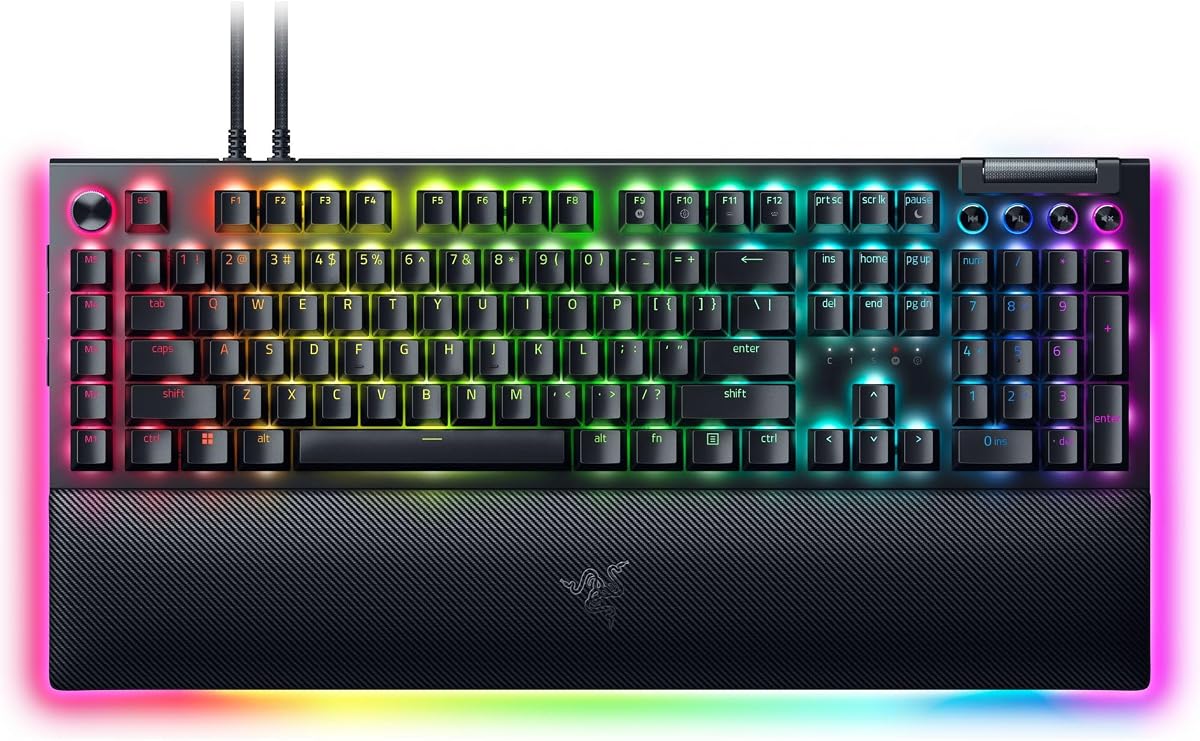
The Razer BlackWidow V4 Pro is a high-end keyboard designed for enthusiasts who demand the best. It features eight dedicated macro keys and a command dial that can be programmed to control various system functions.
We may earn a commission when you buy through this link, at no additional cost to you.
The tactile green switches provide a satisfying click for typists and gamers who prefer feedback. The keyboard includes a magnetic plush wrist rest with underglow lighting that adds a premium touch to any desk setup.
While the price is high the build quality and feature set justify the investment for power users. The doubleshot keycaps ensure that legends never fade even after years of heavy use.
This model is best for those who already use the Razer ecosystem and want a keyboard that integrates seamlessly with other devices. The command dial and macro keys offer deep customization for complex workflows.
The programmable dial adds an extra layer of control allowing you to adjust brightness or navigate menus with a simple twist.
The three side underglow syncs with the Chroma software to create an immersive gaming environment.
We may earn a commission when you buy through this link, at no additional cost to you.
The Redragon K580 offers a solid balance of features and value with its hot swappable design. This allows you to swap switches easily without soldering giving you flexibility to customize the typing feel.
We may earn a commission when you buy through this link, at no additional cost to you.
It includes five dedicated macro keys that record combos on the fly making it suitable for gaming shortcuts. The media wheel and dedicated controls add convenience for daily tasks without leaving your keyboard.
The build quality is robust with double shot keycaps that resist fading over time. The anti ghosting matrix ensures that all keystrokes are registered accurately even during intense gaming moments.
This keyboard is a great choice for users who want mechanical quality at a mid range price. The hot swappable feature makes it future proof as trends in switch preferences change.
The socket design accepts almost any switch allowing you to experiment with different tactile or linear options.
Rated for 50 million keystrokes the keyboard is built to withstand heavy daily use without wearing out.
We may earn a commission when you buy through this link, at no additional cost to you.
The Redragon K550 distinguishes itself with an impressive twelve onboard macro keys. These can be programmed without software making it easy to set up complex sequences for gaming or productivity tasks.
We may earn a commission when you buy through this link, at no additional cost to you.
Its aluminum top plate provides a sturdy and elegant look that keeps the keyboard stable on your desk. The USB pass through port allows you to connect a mouse or receiver directly reducing cable clutter.
The custom purple switches offer a strong tactile feel with a distinct click that enthusiasts often enjoy. Media controls are dedicated for quick access to play pause and volume adjustment.
This keyboard is ideal for those who need a high number of macros without spending a premium. The build quality is robust and the layout supports efficient workflow with easy access to macros.
The integrated port helps keep your desk organized by allowing devices to connect directly to the keyboard.
The brushed aluminum surface adds a premium look and feel while ensuring the keyboard remains steady.
We may earn a commission when you buy through this link, at no additional cost to you.
The Razer BlackWidow V4 X focuses on speed and quietness with its linear yellow switches. These switches offer fast actuation and reset points ideal for rapid fire inputs in competitive games.
We may earn a commission when you buy through this link, at no additional cost to you.
It includes six dedicated macro keys that can be programmed to suit your playstyle. The per key RGB lighting allows for extensive customization through the Chroma ecosystem and the keyboard is designed to be quiet.
Sound dampeners and lubricated stabilizers reduce noise making it a good choice for shared environments. The doubleshot keycaps ensure that legends remain visible even after long term use.
This keyboard is perfect for gamers who prioritize speed and noise reduction. The macro keys provide enough flexibility for most users while keeping the design sleek and modern.
The yellow switches actuate quickly and reset faster than standard switches for faster response times.
The RGB lighting syncs with hundreds of games for an immersive experience that reacts to in game events.
We may earn a commission when you buy through this link, at no additional cost to you.
The Redragon K618 PRO is a versatile wireless option with a remarkable twenty macro keys. These keys can be programmed without software providing instant access to complex commands across multiple devices.
We may earn a commission when you buy through this link, at no additional cost to you.
Its tri mode connectivity allows seamless switching between PC laptop and tablet via USB-C Bluetooth or 2.4GHz wireless. The slim low profile design reduces travel distance for faster actuation and less wrist strain.
The keyboard supports both Windows and Mac systems with a one touch toggle switch making it ideal for hybrid setups. The software allows deeper customization if needed for advanced users.
This model is excellent for users who need flexibility and macro power in a wireless form. The zero lag performance ensures that wireless does not compromise your gaming experience.
The 2.4GHz and Bluetooth options ensure stable connections without wires cluttering your desk.
The Win Mac switch lets you adapt to different operating systems instantly without re pairing.
We may earn a commission when you buy through this link, at no additional cost to you.
The Logitech G213 Prodigy is designed for gamers who also need productivity. It features a full size layout with dedicated media controls and a spill resistant design to protect against accidents.
We may earn a commission when you buy through this link, at no additional cost to you.
Macros can be customized using the G Hub software allowing you to assign complex commands to keys. The integrated palm rest and adjustable feet ensure comfort during long sessions.
The five RGB zones provide visual customization without the complexity of per key lighting. The anti ghosting matrix ensures that your inputs are registered accurately during gameplay.
This keyboard is a reliable choice for mixed use where comfort and durability are key. The macro capabilities are solid for those willing to use the software for setup.
The fluid resistant design protects the keyboard from accidental spills making it suitable for casual use.
The integrated palm rest provides support for your wrists reducing fatigue during extended typing.
We may earn a commission when you buy through this link, at no additional cost to you.
The Corsair K55 RGB PRO is a reliable membrane keyboard with six dedicated macro keys. It offers a practical solution for users who need macros without investing in mechanical switches.
We may earn a commission when you buy through this link, at no additional cost to you.
The IP42 rated design protects against dust and spills ensuring longevity even in busy environments. The detachable palm rest adds comfort and the RGB lighting provides a customizable aesthetic.
Volume and media keys are dedicated for easy access allowing you to control playback without leaving your game. The software allows for deeper customization if you choose to install it.
This model is well suited for casual users who want a durable keyboard with macro capabilities. The balance of price and features makes it a strong option in the budget category.
The IP42 rating gives you peace of mind when using the keyboard near drinks or food.
The palm rest reduces stress on your hands allowing for longer gaming sessions.
We may earn a commission when you buy through this link, at no additional cost to you.
The Razer BlackWidow V4 sits in a solid mid range tier with excellent performance. It features linear switches that are fast and quiet making it suitable for both work and gaming.
We may earn a commission when you buy through this link, at no additional cost to you.
Six dedicated macro keys allow for custom commands and the underglow lighting adds a striking look to your setup. The magnetic wrist rest snaps securely to the keyboard for ergonomic support.
The doubleshot ABS keycaps ensure durability and clear legends over time. The keyboard is part of the Razer ecosystem providing easy integration with other Chroma devices.
This keyboard is perfect for users who want premium features without the highest price tag. The macro capabilities and build quality make it a well rounded choice for many gamers.
The underglow creates a striking visual effect that enhances your desk setup.
The magnetic wrist rest provides comfort and support for long periods of use.
We may earn a commission when you buy through this link, at no additional cost to you.
Choosing the right keyboard with macro keys involves understanding your specific needs for speed, customization, and build quality.
Mechanical switches generally offer better durability and tactile feedback compared to membrane options. Linear switches are fast and quiet while tactile or clicky switches provide a bump or sound that confirms actuation.
Choose a switch type that matches your preference for sound and feel.
Look for onboard macro recording which allows you to program keys directly without software. Some models require software for complex sequences or multi-step macros which adds flexibility but requires installation.
Prioritize onboard macro support if you want quick and easy setup.
A sturdy case and metal top plate can extend the life of the keyboard. Double shot keycaps ensure that legends do not fade over time and spill resistance helps protect against accidents.
Ensure the keyboard is built to withstand your daily use habits.
Full size layouts provide all navigation keys while tenkeyless models save space. The placement and number of macro keys can vary so ensure there are enough keys for your needs.
Select a layout that fits your desk space and workflow requirements.
Wired keyboards offer zero latency which is important for competitive gaming. Wireless options provide freedom of movement but may have slight latency or require battery charging.
Choose wired for competitive play or wireless for a clean desk setup.
An integrated or detachable wrist rest can reduce strain during long sessions. Adjustable keyboard feet allow you to set a comfortable typing angle.
Consider comfort features if you type for many hours each day.
Companion software allows for advanced customization of RGB lighting and macro profiles. Ensure the software is compatible with your operating system before purchasing.
Decide if you are comfortable with software or prefer hardware only solutions.
Prices vary significantly from budget membrane models to premium mechanical keyboards. Determine how much you are willing to spend for the features you need.
Set a budget range to narrow down your options effectively.
To set up macros start by entering the programming mode which is usually accessed via a dedicated Fn key combination. Record your sequence of keystrokes and assign it to a macro key for quick access.
Keep your keyboard clean by regularly dusting the keys and using compressed air to remove debris. Avoid eating or drinking near the keyboard to prevent spills that could damage the internal components.
If your keyboard uses software update it regularly to ensure compatibility with new applications. Check for firmware updates that may improve performance or add new features.
No many keyboards allow you to record macros directly on the hardware without installing any software. These onboard macros are stored in the keyboard's memory and work immediately upon connection.
Yes macro keys are highly useful for productivity. You can assign shortcuts to open applications send emails or perform repetitive text entries to speed up your workflow significantly.
The number of macros you can store depends on the model. Some allow a limited number of onboard profiles while others rely on software to store unlimited macros on your computer.
Mechanical keyboards generally offer better durability and a more satisfying typing experience. However membrane models are quieter and more affordable which may suit different needs.
Most of the keyboards listed work with Mac systems. Some may require specific software or key remapping to function optimally with macOS.
Some models like the VSD K1 Pro and Redragon K580 feature hot swappable sockets. This allows you to replace switches without soldering giving you more customization options.
The VSD K1 Pro and Redragon K512 stand out as top picks for their unique features and value. Whether you need a premium experience or a budget friendly option there is a keyboard here for you.
When choosing prioritize the features that matter most to your daily use. Whether it is the number of macros or the type of switches make sure it fits your needs.
Prices and availability can change so always check the current listings before making your purchase. Verify the product specifications on the manufacturer page to ensure you are getting exactly what you expect.