
Weilisi 10.2 Desk Ring Light
4.5Editor score
360 degree rotation
Adjustable height design
C-clamp mounting system
This guide compares the top key light for streaming options available in October 2026 to help you choose the perfect lighting setup for your content creation
Selecting the right lighting is crucial for any streamer looking to enhance their visual presence and engage their audience effectively.
We have carefully evaluated ten top-rated key lights based on brightness, color accuracy, ease of use, and overall value for money.
Each selection showcases unique strengths to help you find the ideal match for your specific streaming setup while noting that prices fluctuate frequently.
4.5Editor score

4.5Editor score

4.4Editor score
Here is a side-by-side comparison of all ten key lights to help you quickly identify which model fits your specific streaming requirements and budget constraints.



The Elgato Key Light stands out as a top-tier option for streamers seeking professional-grade illumination without the complexity of traditional studio lighting.
We may earn a commission when you buy through this link, at no additional cost to you.
Its 2800 lumens output ensures your face is well-lit even in larger rooms while the Wi-Fi enabled control allows seamless adjustment via desktop app.
The opal glass face provides evenly balanced glare-free diffusion that looks natural on camera and the OSRAM LEDs keep heat levels impressively low.
Ideal for serious streamers who value reliability and color accuracy this light delivers a polished look that enhances viewer engagement significantly.
Manage brightness and color temperature without reaching for the light ensuring you stay focused on your content during live streams.
Adjust from sunset amber to arctic blue to match your room ambiance or achieve a specific mood for your broadcasts easily.
We may earn a commission when you buy through this link, at no additional cost to you.
The Logitech Litra Glow is an excellent choice for streamers who prioritize ease of use and natural-looking light for video conferencing or gaming.
We may earn a commission when you buy through this link, at no additional cost to you.
Its TrueSoft technology delivers balanced full-spectrum LED light that eliminates harsh shadows and ensures your complexion looks radiant on camera.
The frameless diffuser radiates wide light that flatters the subject while the 3-way monitor mount offers precise positioning on desktops or laptops.
Perfect for content creators who want a portable reliable light that integrates smoothly with their existing setup without complex installation steps.
Achieve optimal lighting for video calls and Zoom meetings with balanced light that enhances your natural features effectively.
Designed to meet strict UL testing guidelines making it safe for all-day streaming without causing discomfort or eye strain.
We may earn a commission when you buy through this link, at no additional cost to you.
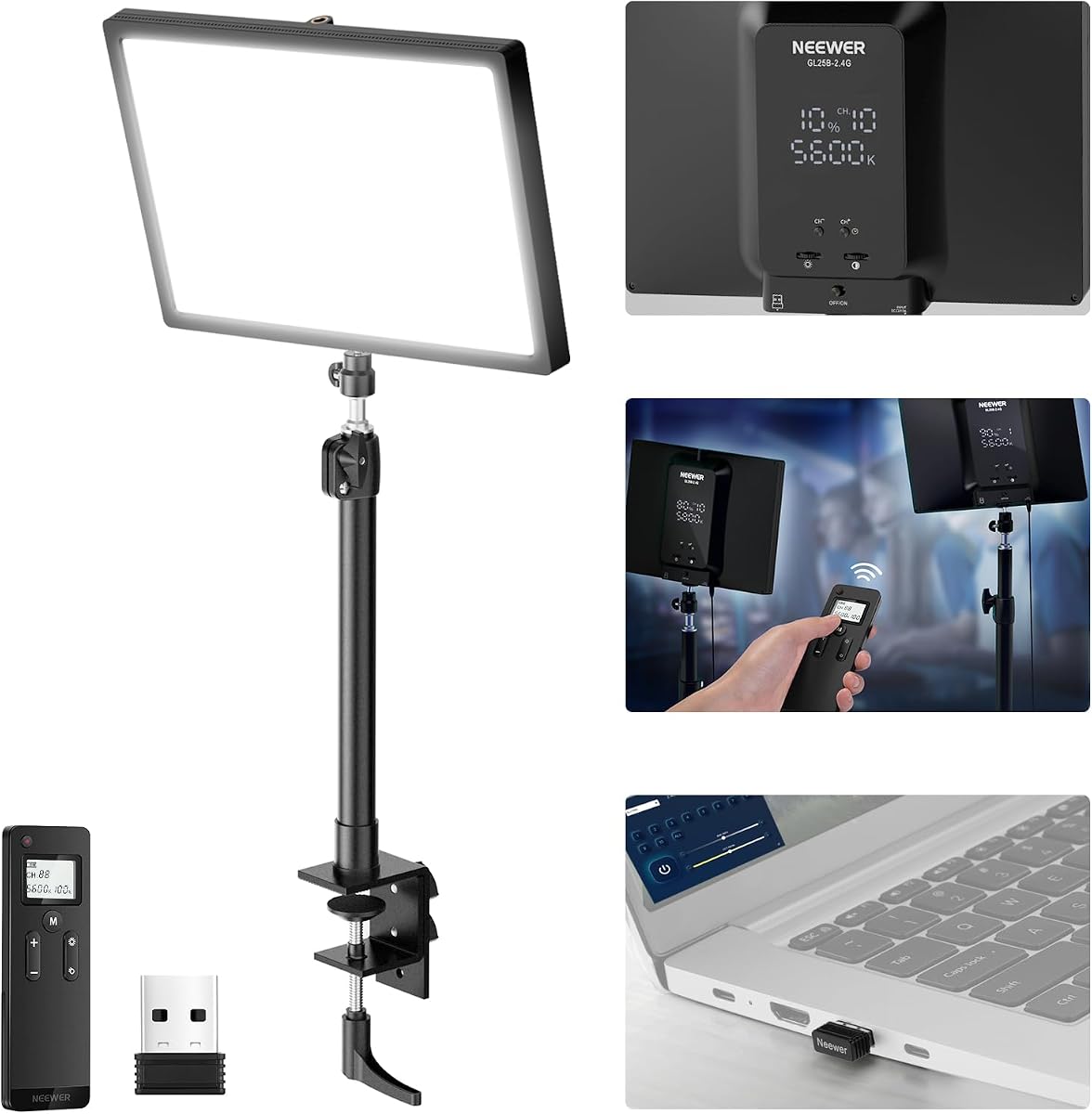
The NEEWER GL25B offers exceptional value with its high CRI and stepless brightness adjustment making it a versatile tool for streaming and recording.
We may earn a commission when you buy through this link, at no additional cost to you.
Its edge emitting soft glow technology ensures bright diffused illumination without harsh shadows while the fanless cooling system keeps noise at zero.
The included 2.4G remote allows you to operate one or multiple lights wirelessly which is great for setups needing synchronized lighting adjustments.
Streamers looking for a cost effective solution that doesn't compromise on quality will find this light meets their professional needs perfectly.
Advanced edge lit technology delivers soft bright light that is gentle on the eyes even during long streaming sessions.
Fanless cooling ensures quiet operation which is essential for immersive live streaming where background noise can be distracting.
We may earn a commission when you buy through this link, at no additional cost to you.
The Elgato Key Light Air MK.2 delivers 50 percent more brightness than its predecessor in a slim 15 inch panel ideal for desk setups.
We may earn a commission when you buy through this link, at no additional cost to you.
You can power it via USB-C a PD adapter or a battery bank offering three versatile ways to keep your light running during broadcasts.
Touch and app control let you adjust settings directly on the light while Stream Deck support adds a layer of automation for streamers.
This model is perfect for those who want a compact yet powerful light that fits seamlessly into a minimalist streaming environment.
Enjoy 256 premium LEDs with a range from warm to cool white light that renders color naturally on camera every time.
Use Stream Deck to automate your light with a single keypress saving time and keeping your focus on the content.
We may earn a commission when you buy through this link, at no additional cost to you.
The Weilisi 10.2 Desk Ring Light provides an affordable entry point for streamers needing reliable lighting without breaking the bank.
We may earn a commission when you buy through this link, at no additional cost to you.
Its 360 degree rotation and adjustable height design allow you to position the light exactly where you need it for optimal coverage.
The big metal C-clamp secures the light to desks up to 2.34 inches thick ensuring stability and saving space on your workspace.
With 10 brightness levels and 3 color temperatures this ring light adapts to various needs making it a versatile tool for content creation.
The non-slip silicone base and clamp design keep your desk looking cleaner and tidier while providing stable support.
Perfect for video conferences gaming reading and shooting this light adapts to your needs and improves photo and video quality.
We may earn a commission when you buy through this link, at no additional cost to you.
The NiceVeedi Studio Light Kit provides two versatile lights that can be used as key and fill lighting for a balanced look.
We may earn a commission when you buy through this link, at no additional cost to you.
Each panel offers high CRI and dimmable brightness ranging from 10 to 100 percent allowing you to tailor lighting for various scenarios.
The included tripods stand up to 60 inches and have adjustable angles which is essential for achieving professional lighting setups at home.
Ideal for beginners needing both a main and fill light this kit offers great versatility without requiring complex equipment or skills.
Choose from 2800K 4800K or 6500K to create different lighting atmospheres that suit your content style or environment.
Power the device via USB-C with a phone or laptop charger which adds flexibility for mobile setups or travel.
We may earn a commission when you buy through this link, at no additional cost to you.
This dual light kit stands out with its gooseneck tubes that offer precise angle options for targeted lighting on your desk setup.
We may earn a commission when you buy through this link, at no additional cost to you.
The LCD screen clearly shows brightness and color temperature which makes it easy to adjust settings reliably during your workflow.
With CRI of 95 plus and dimmable range from 1 to 100 percent these lights deliver soft flicker-free illumination gentle on the eyes.
Streamers who need flexible positioning without bulky stands will appreciate the stability and space-saving design of this lighting kit.
The tube can rotate to multiple positions providing more lighting angle options to achieve optimal lighting effects based on your needs.
The control panel records the last setting when you turn off the light making your operation easier and more efficient every time.
We may earn a commission when you buy through this link, at no additional cost to you.
The Godox ES45 delivers a soft diffused illumination that minimizes harsh shadows ensuring a polished look for any streaming or video call.
We may earn a commission when you buy through this link, at no additional cost to you.
Its magnetic auto-charging remote attaches to the back and detaches in seconds allowing real-time adjustments without interrupting your stream.
The edge-lit OLED panel is designed to reduce eye fatigue so you can game or stream comfortably all day without feeling strained.
This light is perfect for those who want high-end features like app-based group control and a sleek design that keeps your desk tidy.
The remote snaps back onto the panel to recharge automatically so you never have to worry about separate batteries.
Its extendable clamp stand and hidden cables give you a sleek professional-looking setup that keeps your workspace organized.
We may earn a commission when you buy through this link, at no additional cost to you.
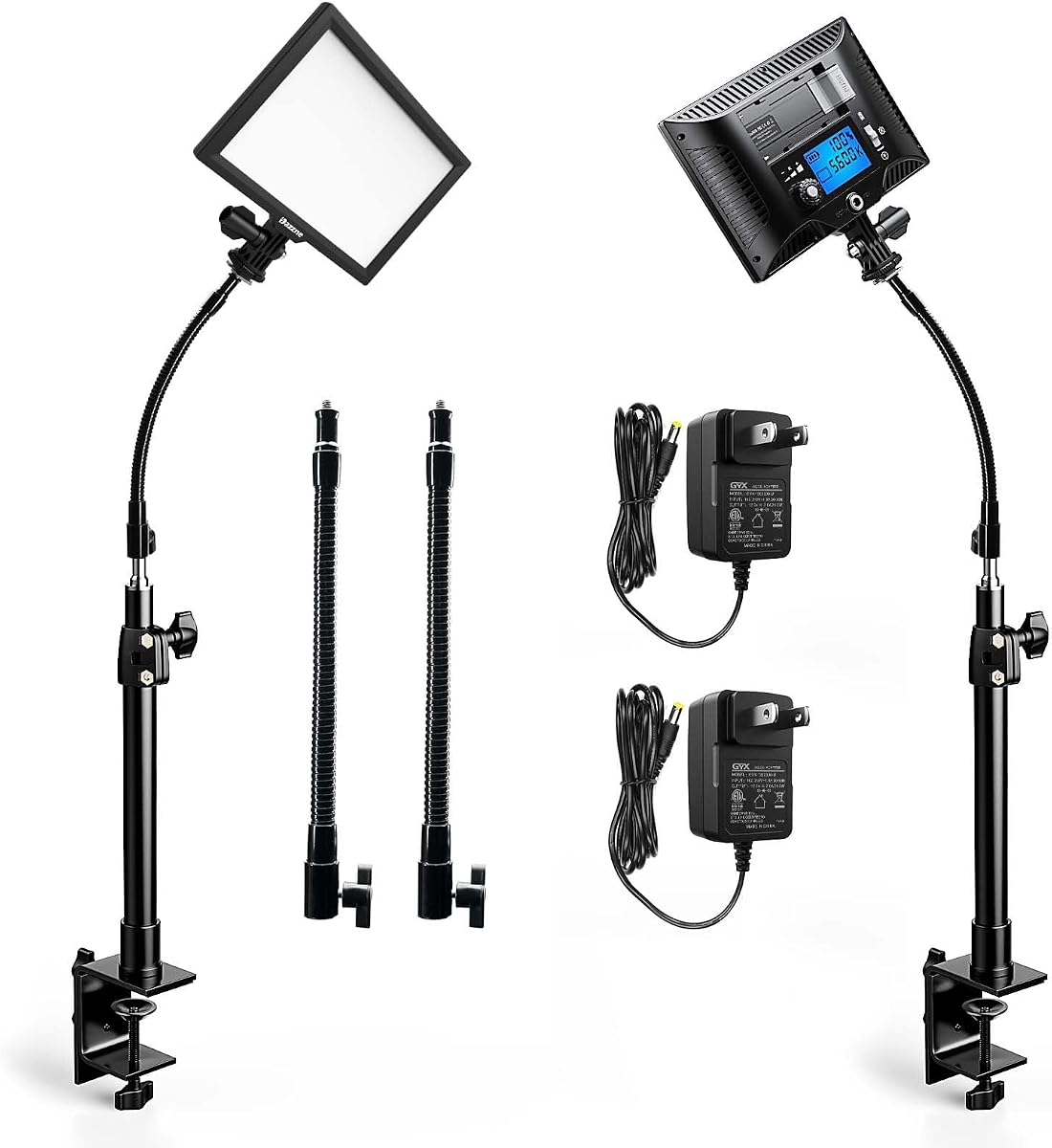
The Dazzne D20 video panel light kit offers a practical solution for streamers needing dual lighting at a budget-friendly price.
We may earn a commission when you buy through this link, at no additional cost to you.
Its gooseneck tubes provide more lighting angle options and the adjustable stand ensures flexible height adjustment for optimal results.
The control panel features a built-in memory function that records your last settings making it efficient to use every day.
Ideal for those starting out or needing simple dual light setups this kit provides continuous illumination for podcasts and YouTube vlogs.
Check brightness color temperature and power clearly on the screen which helps you control dimming parameters accurately.
Equipped with gooseneck tubes these lights can be rotated to multiple positions to fit your specific streaming requirements.
We may earn a commission when you buy through this link, at no additional cost to you.
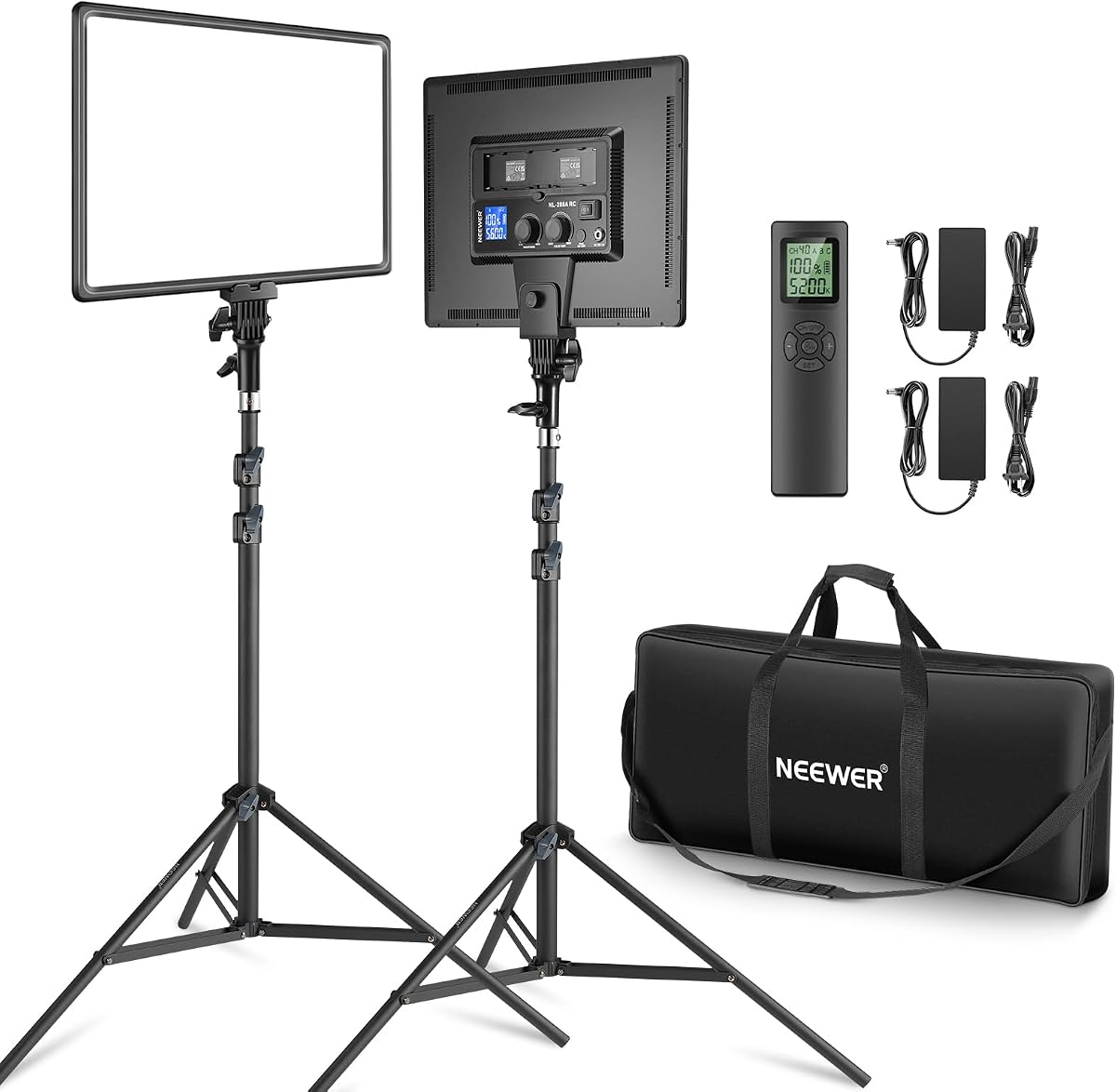
The Neewer 18 LED Video Light Panel Kit delivers high power and versatility suitable for professional photography and streaming setups.
We may earn a commission when you buy through this link, at no additional cost to you.
With 4800 lux at 0.5 meters it provides enough illumination to light up entire rooms or large backdrops effortlessly for any session.
The 2.4GHz remote lets you switch channels and groups which is essential for managing complex lighting setups without touching the panels.
This kit is perfect for advanced users who need bright flexible lights with dual power options to keep shooting anywhere anytime.
Two stable aluminum alloy tripod light stands deliver soft continuous flicker free lighting for video shooting and live streaming.
You can use AC power adapter or Sony NP-F batteries allowing you to keep shooting without worrying about running out of power.
We may earn a commission when you buy through this link, at no additional cost to you.
Choosing the right key light involves understanding your needs and the technical specs that impact video quality.
Brightness is measured in lumens or lux. Higher lumens ensure your face is visible in larger rooms or bright environments. Look for at least 2000 lumens for effective streaming coverage.
Aim for higher brightness if you have natural light or large spaces to maintain clarity and visibility.
Color temperature affects the mood and natural look of your video. A wide range like 2900K to 7000K allows you to match ambient lighting or create custom looks.
Adjustable temperature ensures you can match your room’s light and look natural on camera.
CRI indicates how well a light renders colors. Higher CRI values above 95 ensure your skin tones and props look accurate on camera.
Prioritize high CRI models to avoid color distortion in your broadcasts.
Control methods include physical dials, remotes, or apps. Wi-Fi or app control offers convenience for adjusting light without touching it during streams.
Choose control that fits your workflow to avoid distractions while streaming.
Some lights clamp to desks while others use tripods. Desk mounts save space and tripods offer height flexibility. Portability is key if you move setups often.
Select mounting based on your desk space and need for mobility.
Lights may be USB powered or require AC adapters. USB options are versatile for laptops and power banks. AC ensures consistent output for long sessions.
Match power source to your device availability and streaming duration needs.
Materials like metal ensure durability and heat dissipation. Low heat and silent cooling fans prevent distraction and extend light lifespan.
Invest in sturdy models with efficient cooling for safe long-term use.
Prices vary widely but cost does not always guarantee quality. Balance specs like brightness and control features against your budget for best value.
Prioritize features you need over extra specs to maximize return on investment.
Position your key light at eye level or slightly above to create flattering shadows and avoid unflattering angles on your face.
Adjust brightness and color temperature to match your room's ambient lighting for a seamless and professional on-camera appearance.
Keep the LED panel clean by wiping it gently with a soft cloth and ensure proper ventilation to maintain performance over time.
Mount your key light so the center is at or slightly above your eye level to create a flattering angle. Adjusting height helps avoid harsh shadows under your eyes and ensures natural lighting.
Wi-Fi control is not necessary but it adds convenience by allowing you to adjust brightness without touching the light. Physical controls or remotes work just as well if you prefer simplicity.
Yes, key lights are ideal for video calls as they provide consistent illumination that improves visibility and professionalism. Adjust settings to match your room light for best results.
CRI measures color accuracy while color temperature determines warmth or coolness. High CRI ensures true colors and adjustable temperature allows you to match ambient light.
A tripod is useful if you need height flexibility or plan to move your light often. Desk clamps save space and work well for stationary setups.
Use diffusers or adjust the light angle to avoid direct reflection on screens or glass. Soft light panels also minimize glare and create a smoother image.
We explored ten top key lights including the Elgato Key Light Logitech Litra Glow and Godox ES45 which stand out for their performance and features.
Prioritize brightness color accuracy and control features that align with your streaming style and budget to get the most value from your investment.
Remember to check current prices and availability as these can fluctuate and ensure the light you choose fits your specific setup needs.