
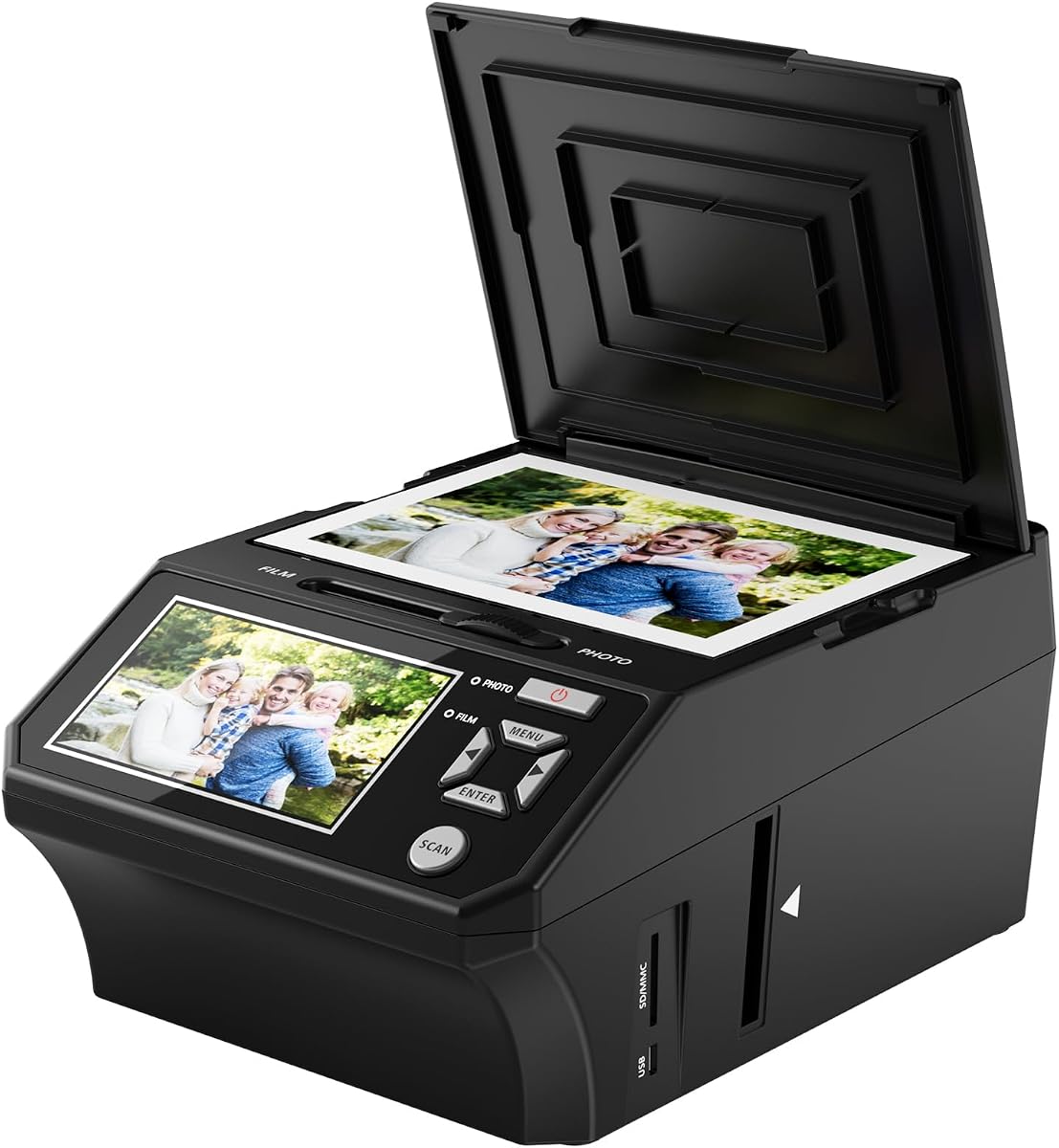
22MP Film & Slide Scanner with 5 LCD
4.3Editor score
Affordable price point
Built-in memory storage
HDMI and USB output
This guide compares the top 35mm slide scanners for digitizing old film, slides, and negatives with ease and high resolution for archiving.
Finding the right device to digitize old film is essential for preserving memories. A good 35mm slide scanner offers high resolution, easy loading, and standalone operation without needing a computer to convert your photos into digital files.
We evaluated ten top-rated models based on sensor quality, display size, format support, and ease of use. Our list covers standalone units with built-in screens, HDMI output, and SD card saving to help you choose the best option for your needs.
Each pick highlights key features, pros, and cons to guide your decision. Remember that product availability and prices can change frequently, so verify current details before purchasing to ensure you get the best value for your investment today.
4.3Editor score

4.3Editor score

5.0Editor score
This table provides a side-by-side look at the specifications and capabilities of all ten models reviewed to help you compare features like resolution, display size, and supported formats quickly.






The KODAK Slide N Scan is a popular choice for converting old film to digital files. It holds a solid rating and is known for its ease of use. The device allows you to view and edit photos directly on the scanner without needing a computer.
We may earn a commission when you buy through this link, at no additional cost to you.
Its 22MP resolution captures detailed images from your 35mm slides and negatives. The 5 inch LCD screen provides a clear view of your photos for immediate previewing. This feature makes it simple to check scans before saving them to an SD card.
Some users note that the software options are straightforward but not highly advanced. While it handles color and black and white negatives well, you may need additional software for heavy editing later. The lack of an included SD card is also a minor inconvenience.
This model is ideal for families looking to archive memories without technical hassle. If you want a reliable scanner that balances quality and simplicity, this is a strong candidate for your collection of digitization tools.
The large screen lets you adjust brightness and color immediately after scanning.
Adapters for multiple formats make it easy to scan various old film types.
We may earn a commission when you buy through this link, at no additional cost to you.
The Magnasonic scanner stands out for its ability to handle Super 8 film in addition to standard 35mm. This makes it a versatile tool for those with diverse film collections. The 24MP sensor ensures high quality digital outputs for your cherished memories.
We may earn a commission when you buy through this link, at no additional cost to you.
Its 5 inch display allows you to browse images instantly. You can save photos directly to an SD card without connecting to a computer. The HDMI output option lets you view your photos on a larger TV screen for family gatherings.
While the scanning process is quick, some users report that aligning certain film types can require patience. The software for color correction is built in but may need practice to master. Overall, the speed and convenience are significant benefits.
Choose this scanner if you have Super 8 reels to digitize. It offers a comprehensive solution for various formats and is perfect for users who want to preserve old memories with minimal setup time.
Unique support for Super 8 film makes it stand out from many competitors.
No drivers or complex software needed for basic scanning and saving tasks.
We may earn a commission when you buy through this link, at no additional cost to you.
The Slide N Scan Max improves on the base model with a streamlined tray design. This feature reduces the need for repositioning film during scanning. It is designed to make the process more efficient for users with large collections to archive.
We may earn a commission when you buy through this link, at no additional cost to you.
Capturing detailed images up to 22MP interpolation helps preserve fine details in old photos. The simple one touch editing options allow you to adjust size and color quickly. The device works independently of a computer which saves setup time.
Some users find the price higher than the standard model. While the tray is smoother, the sensor resolution is similar to other models in this class. The benefits are mostly in convenience rather than a massive leap in image quality.
This version is best for those who scan frequently and want ease of use. If you prefer a device that minimizes manual handling of film strips, the smooth tray is a valuable feature to consider.
The tray design allows for faster workflow when processing many slides.
Save directly to SD cards for a mobile and independent digitization setup.
We may earn a commission when you buy through this link, at no additional cost to you.
This model offers a comprehensive bundle that includes an SD card right out of the box. That is a significant value add compared to many competitors. It also supports printed photos in addition to film and slides which adds versatility.
We may earn a commission when you buy through this link, at no additional cost to you.
The 5 inch HD screen provides clear viewing for your scans. You can edit images on the device without needing drivers or software on a computer. The three year warranty offers peace of mind for long term use of the scanner.
While the SD card capacity is modest it is sufficient for initial testing. Some users may find the photo size support limited to standard prints. However, for a family looking to digitize various paper and film items it is very useful.
Consider this model if you want a ready to use package. The included accessories and warranty make it a convenient choice for those who do not want to buy extra items separately.
Accessories like the SD card and trays are provided to start immediately.
Unlike most scanners it handles printed photos in addition to film and slides.
We may earn a commission when you buy through this link, at no additional cost to you.
This scanner provides high specs at a lower price point than many rivals. It features 22MP resolution and a 5 inch screen which are impressive for its class. The built-in memory allows you to save a few scans without an SD card.
We may earn a commission when you buy through this link, at no additional cost to you.
The interface is designed to be intuitive for all ages. You can connect to a TV via HDMI to view photos on a big screen. This feature is great for sharing memories during family events or gatherings.
While the price is attractive the build may feel less premium than higher end models. Users should ensure they have an SD card for larger storage needs. The warranty period is standard but worth checking upon purchase.
Pick this if you need a reliable scanner on a tight budget. It balances performance and cost well and includes useful features like HDMI output that are often absent in cheaper models.
Get 22MP resolution and a large screen without spending a premium amount.
Use HDMI or USB to share photos on TV or transfer to computer easily.
We may earn a commission when you buy through this link, at no additional cost to you.
The HP scanner offers a large 7 inch touch screen for intuitive control. This makes navigation and editing much easier compared to button only devices. The touch interface allows for seamless previewing and managing of your photos directly.
We may earn a commission when you buy through this link, at no additional cost to you.
It uses a 13MP CMOS sensor to capture clear and vivid digital memories. The rapid batch scanning feature helps process mixed collections quickly. You can crop and adjust images without needing any additional software on a computer.
The higher price reflects the premium display and build quality. Some users might find the touch screen requires adjustment if they are used to physical buttons. The lack of an included card is a minor consideration at this price level.
Ideal for users who want a modern interface and high usability. If you prefer touch navigation and need a device that looks and feels like a professional tool this model fits the bill well.
The large touch screen simplifies navigation and editing for all users.
Quick feed trays allow you to process multiple slides in less time.
We may earn a commission when you buy through this link, at no additional cost to you.
This HP model features a 5 inch touch screen and USB-C power which is modern and convenient. The touch display allows you to preview and edit images directly on the device. It is designed to turn into a vibrant picture frame with gallery mode.
We may earn a commission when you buy through this link, at no additional cost to you.
The 22MP interpolation helps capture fine details from your film. The quick-load tray makes scanning different formats like 135 and 126 seamless. You can save images directly to an SD card for easy transfer to computers.
While the USB-C is a plus it does not significantly change image quality. Some users may find the price higher than non-touch models with similar sensors. However the modern connectivity and interface justify the cost for many buyers.
Choose this if you want a modern design with touch controls. It offers a good balance of features and looks great in a home office or living room setup.
USB-C power makes connection flexible with modern laptops and adapters.
The touchscreen allows for easy navigation and editing without external tools.
We may earn a commission when you buy through this link, at no additional cost to you.
The KODAK SCANZA offers a 3.5 inch LCD which is compact but bright. It supports a wide range of formats including 8mm film which many others miss. The unit comes with multiple adapters for flexible operation with various film types.
We may earn a commission when you buy through this link, at no additional cost to you.
Adjustable brightness and tilt allow for easy viewing angles. One touch buttons simplify the process of scanning and saving images. HDMI cable included lets you transfer photos to a TV for larger viewing experiences.
The smaller screen may be less comfortable for detailed editing. Users need to provide their own SD card for storage. However the included HDMI and adapters make it a complete kit for basic needs.
This model is suitable for those with limited space or 8mm collections. If you need to scan older formats and want a compact design this scanner is a practical option.
Supports 8mm and Super 8 which expands compatibility beyond standard 35mm.
Includes HDMI and other cables to start scanning and viewing immediately.
We may earn a commission when you buy through this link, at no additional cost to you.
The DigitConvert scanner is very small and easy to carry around. It features a 2.4 inch screen for instant preview and editing of photos. This unit is truly portable and works without any software installation on computers.
We may earn a commission when you buy through this link, at no additional cost to you.
Batch scanning for 135 film makes it efficient for strips of negatives. The fast-load adapters ensure film stays stable during the process. You can share memories via USB or TV out for viewing on other devices.
While the price is low the small screen may make editing difficult. The rating is lower which suggests some quality issues with durability or accuracy. Users should manage expectations regarding build quality when buying.
Choose this for basic needs and travel. If you want a simple and small tool to convert photos without bulk this might be the right choice for you.
The small size makes it easy to transport and store anywhere easily.
Plug and play operation means you can scan without installing drivers or apps.
We may earn a commission when you buy through this link, at no additional cost to you.
The ClearScan T7 features a large touch screen that reduces button confusion. It is designed to be comfortable for parents and first-time users to operate. The included SD card means you can start scanning immediately without extra purchases.
We may earn a commission when you buy through this link, at no additional cost to you.
It produces 24MP digital photos which are clear and suitable for sharing. The interface helps simplify the process of digitizing old film at home. Users can preview adjust scan and save directly without complex software setup.
While the brand is less known the features are competitive. The touch screen is the main advantage but advanced editing options may be limited. For basic archiving and sharing this model covers most common needs well.
Select this if you want an easy to use device. The touch interface and included accessories make it a great entry level option for families.
A touch screen simplifies navigation for users unfamiliar with physical buttons.
Includes an SD card to start scanning and saving photos right away.
We may earn a commission when you buy through this link, at no additional cost to you.
Choosing a scanner depends on your needs for resolution, ease of use, and budget. This guide highlights key factors to consider.
Resolution determines the level of detail in your digital photos. Look for models with at least 20MP interpolation for good quality prints. The sensor size and quality also affect color accuracy and noise in low light.
Higher resolution is key for preserving fine details in old film.
A larger display makes it easier to preview and edit photos. Touch screens are more intuitive than button interfaces for many users. Consider if you want to view images on the device or transfer them immediately.
Prioritize a screen size that allows clear image inspection.
Ensure the scanner supports your specific film types such as 35mm 110 126 and Super 8. Some models only work with slides and not negatives so check compatibility. Adapters may be required for different formats.
Check that the unit handles all your existing film collections.
Look for one-touch scanning and simple menus if you want hassle-free operation. Devices that work without a computer are ideal for quick digitization. Intuitive controls reduce the learning curve for all family members.
Choose a model with straightforward controls to save time.
SD card slots allow you to save photos directly without cables. HDMI outputs are useful for viewing photos on TVs. USB connectivity helps transfer files to computers for backup.
Ensure you have the necessary ports for your workflow needs.
Some scanners come with SD cards cleaning brushes or HDMI cables. These extras add value and reduce the need for separate purchases. Check what is in the box before you buy.
Accessories can make the setup process faster and easier.
A longer warranty period indicates confidence in the product quality. Look for models with at least a one year warranty. Customer support availability is also important for troubleshooting issues.
Verify warranty terms to protect your purchase long term.
Compare features against the price to ensure you get good value. Budget models may lack features like touch screens or large displays. Higher end models offer better build quality and more versatile options.
Balance your needs with your budget to find the best fit.
Start by connecting the power adapter or USB cable to the scanner. Insert an SD card if your model requires one for storage. Load your film or slides into the provided trays ensuring they are aligned correctly to avoid jams.
Turn on the device and select the film type using the menu. Press the scan button to capture the image. Use the screen to preview and edit colors or brightness before saving to the SD card.
Keep the scanner clean by using the included brush to remove dust from trays. Store the unit in a cool dry place when not in use. Regularly update software if connected to a computer to maintain performance.
Many modern slide scanners work independently without a computer. They allow you to scan and save directly to an SD card. This makes the process simpler for users who want to preserve memories without technical setup.
Most models support a variety of formats including 35mm 110 and 126 film. Some even handle Super 8 and 8mm reels. Always check the specific format support before purchasing to match your collection needs.
A resolution of 20MP or higher is generally recommended for good quality prints. This ensures fine details are captured during the digitization process. Higher resolution also helps preserve color accuracy and sharpness.
Most scanners do not include an SD card so you may need to buy one. Some premium models come with one included for convenience. Check the product details to confirm if storage media is provided.
Use a soft lint-free cloth to remove dust and fingerprints. Avoid using harsh chemicals that could damage the film. The included brush often helps clean the light box of the scanner.
Yes many models offer basic editing tools like color correction and cropping. These adjustments are made directly on the device screen. Advanced editing still requires software on a computer or mobile device.
Most scanners are designed to be gentle on film. However always handle old slides carefully to avoid scratches. Using the provided trays helps keep films stable during the scanning process.
Stand-alone scanners have built-in processing and storage. They function like a digital camera and do not require external drivers. This simplifies setup and allows for immediate use.
The KODAK Slide N Scan offers a balanced performance for most users seeking quality. For those on a budget the 22MP Film Slide Scanner provides good value with solid features. The ClearScan T7 stands out for its touch interface and ease of use.
Prioritize resolution and format support based on your specific needs. If you value simplicity choose a model with a large touch screen or standalone operation. Consider the included accessories to determine overall value.
Prices and availability may change so always check current listings before purchasing. This guide helps you make an informed decision to preserve your memories effectively.